What is Augmented Reality, and Why is it Booming on Android?
Augmented reality is no longer a mere idea of the future; it is already part of the present, with applications for Android powered by ARCore and Unity.
According to Statista, the augmented reality market is experiencing rapid growth driven by increasing mobile usage and enterprise adoption. The number of people who have adopted mobile augmented reality exceeds 1.07 billion, and growth is expected to remain steady through 2026. The e-commerce, gaming, and healthcare industries are driving demand for AR apps in the Android app store.
The use of AR technology has opened up new possibilities for user engagement with applications. AR provides a unique user experience distinct from traditional applications. With AR technology, one can interact with applications without being limited to their device’s screen.
If you want to develop an AR application on your Android device, you should understand the unique features and popularity of this technology. Currently, an AR app development company does not limit its services to entertainment applications; it creates applications for various sectors, including retail, education, health care, and real estate.
The Android operating system’s contribution to this process deserves mention. Due to the widespread use of Android smartphones, there are ample opportunities to develop AR apps.
How AR Works on Android Devices?
To develop an augmented reality application for Android, it is important to understand what happens behind the scenes. Augmented reality applications for Android require development tools such as ARCore, which enable the device to sense its environment and create virtual objects within it.
Technically, here’s how augmented reality works:
- Motion tracking: Determines the device’s location and orientation.
- Environmental understanding: Determines flat surfaces such as floors, tables, and walls.
- Light estimation: Ensures that virtual objects match the environment’s lighting conditions.
These processes allow for an effortless blend of real and virtual environments that feels natural. This makes AR apps feel natural and interactive for Android users.
Prerequisites Before You Start Building
To understand the development requirements for creating your AR app, it is important to know everything before building on the Android platform. Many developers overlook development requirements, but they are very important because they make the development process easier.
The development requirements for your Android AR app include selecting the right hardware, setting up the appropriate development environment, and hiring a top development team. Wondering what development requirements are needed to develop your AR app?
Hardware and Software Requirements
The prerequisites for Android AR development include the appropriate software and hardware. Developers use Android Studio to develop and test their apps on devices. ARCore powers AR functionality, while Unity provides the essential tools for handling 3D objects.
Software Requirements:
- Android Studio
- ARCore SDK
- Unity/Unreal Engine
Hardware Requirements:
- Android phones with ARCore support
- Powerful PC/Laptop for coding and app development
- Depth sensors or LiDAR-capable devices (optional)
Skills and Team Structure You’ll Need
Developing an AR app requires a team of professionals rather than a single programmer, as it requires expertise in AR frameworks, 3D modeling, Android development, and user interface design.
The Common AR App Development Team
- AR Developers: Knowledge in ARCore, Unity, and 3D spaces.
- Android App Developers: Manage app logic and app integration.
- UI/UX Designers: Develop a good user interface for the AR application.
- 3D Artists/Modelers: Create 3D assets that perform efficiently in mobile apps.
- Quality Assurance (QA) Testers: Perform testing to evaluate the app’s performance.
Skills Needed for AR Development
- Knowledge in spatial computing
- Understanding 3D interaction design
- Optimizing performance on mobiles
- Cross-platform problem solving
Core Technologies Used to Build an AR App for Android
In Android AR development, choosing the right tools is important for ensuring a successful outcome. The tools used to develop AR applications for Android platforms may include either native development tools or third-party AR libraries for motion tracking and 3D modeling.
ARCore – Google’s Native AR Framework
ARCore is an official Google framework for developing Android applications with AR capabilities. Thus, it is considered one of the most popular SDKs for creating Android apps with augmented reality features.
Main facts about ARCore:
- ARCore definition: An advanced framework offered by Google for creating AR applications on Android platforms.
- ARCore Android development: Supports integration into Android Studio to code and test AR apps.
- Google ARCore tutorial: Features detailed manuals and tutorials for both beginners and professionals.
- ARCore versus ARKit: ARCore is designed for Android devices, whereas ARKit is used for iOS applications.
Unity and Unreal Engine for AR
The Unity engine or Unreal Engine must be used in tandem with ARCore to develop graphical AR applications. This is because both Unity and Unreal Engine provide advanced 3D modeling and rendering features, without which it would not be possible to develop Unity AR Android applications and Unreal Engine AR Android applications.
- Unity ARCore development: Adds ARCore features to Unity for interactive 3D AR applications.
- Unreal Engine AR Android: Provides realistic simulations through high-end graphics for AR applications.
Vuforia and Other Third-Party SDKs
Tools such as Vuforia are commonly used to develop Android applications. It is used when an AR application needs to incorporate functions such as object and image recognition. An Android app development company may therefore prefer it.
- Vuforia AR Android: Offers image/object tracking for dynamic AR.
- Best choice for developers seeking alternative options to ARCore.
- It can help save time during the development of interactive AR.
Step-by-Step Process to Build an AR App for Android
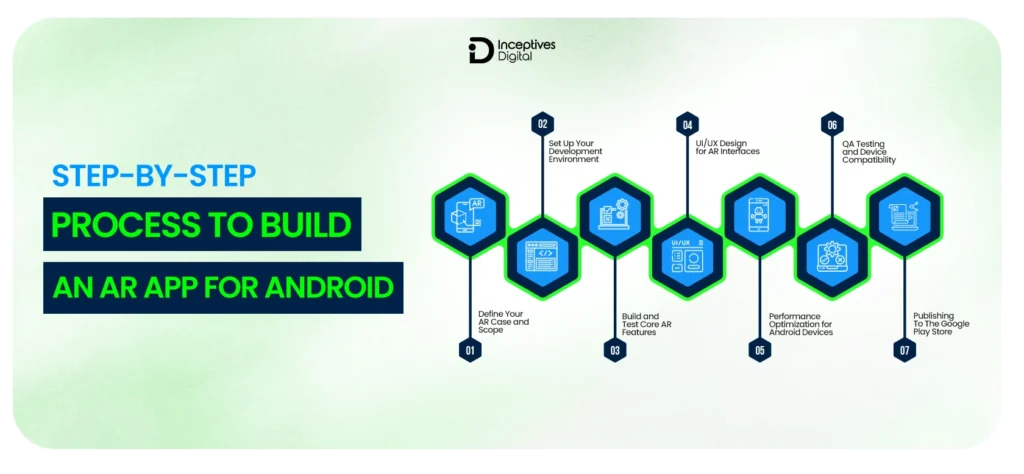
Developing an augmented reality app on Android requires a strategy that ensures smooth operation, creates an interesting experience, and works across various systems. This article presents the full process from the initial concept to the final development of an Android augmented reality app.
Step 1: Define Your AR Use Case and Scope
One of the basic considerations in developing an augmented reality application is determining the exact problem you want to address. Review some case studies where an application was created using augmented reality for the Android platform, and generate ideas for an augmented reality application for the Android platform.
Step 2: Set Up Your Development Environment
Afterward, configure your software to create an AR environment on Android. This can be achieved by setting up Android Studio and ARCore, or by using Unity ARCore if you are using a game engine. Configurations will make programming, debugging, and testing easier. Setting up ARCore on Android Studio is crucial to learn.
Step 3: Build and Test Core AR Features
It is now the right time to incorporate the AR features in the Android system. This includes implementing ARCore features such as plane detection, motion tracking, and lighting estimation. Focus on the basic features of augmented reality that will be incorporated into the Android application.
Step 4: UI/UX Design for AR Interface
The creation of the interface is crucial to the adoption process. Apply the principles of AR app UI/UX design to create AR interfaces and interactions. Pay attention to AR UX design for Android with natural gestures, visual signals, and no cluttered menus. The perfect interface ensures a fully immersive AR experience.
Step 5: Performance Optimization for Android Devices
Optimization ensures your AR application operates efficiently. Employing the AR application performance optimization for Android approach, minimizing the size of 3D assets, and reducing unnecessary background processes can help improve performance. You will learn how to optimize an AR application on Android and reduce lag.
Step 6: QA Testing and Device Compatibility
Testing is very important. Test your AR app across different devices, run quality assurance tests, and ensure your Android AR devices are compatible. It will help with correct object positioning, proper interaction, and effortless functioning. This will prevent crashes and increase user satisfaction.
Step 7: Publishing to the Google Play Store
Finally, prepare your AR application for launch via the Google Play Store. Learn how to publish your app in the Google Play Store by following the AR app submission guidelines and process, ensuring your app meets the required criteria. Find out more about AR app submission to Google Play.
Must-Have Features of a Successful AR Android App
The success of AR technology depends not only on adding virtual objects but also on providing an engaging, immersive experience for users. When developing an AR application for Android, several fundamental aspects should be considered.
Surface Detection and Tracking
plane detection and tracking lie at the heart of augmented reality apps. It allows the app to recognize and analyze its environment and detect surfaces such as walls, floors, and tables. With technologies like ARCore, movement tracking, and object placement, these tasks become easier.
3D Object Rendering and Anchoring
There is realism in the perception of how the objects will be observed when rendered and anchored in place. The objects have been modeled and correctly anchored to the appropriate locations to avoid movement. This is a key component in developing AR apps for Android phones.
User Interaction and Gesture Controls
User interaction is what distinguishes augmented reality from mere visual aids. Users interact with virtual objects through actions such as taps, drags, pinches, and rotations. The smoothness and effectiveness of user interactions significantly influence user engagement and usability.
How to Choose the Right Development Approach?
Another important decision you will have to make for your Android AR application is selecting the development process. This decision will influence many factors, including the application’s performance and its total development cost. To develop a successful AR Android application, you need to choose an effective development process.
First, when selecting an AR development platform for your application, consider your project’s features, size, and complexity, as well as your target audience. If your project requires an application that performs effectively and offers advanced tracking features, a native platform might be a better choice. However, if speed is what you need, go with cross-platform app development.
Additionally, consider your team members’ expertise and your project’s futuristic outlook. The best fit mobile app tech stack not only makes it easier for you to develop your app but also serves as the bedrock for future improvements.
Challenges in AR App Development and How to Solve Them
An Android application that utilizes AR technology also has its own set of specific challenges. These range from performance issues to environmental constraints, and the developer must consider them to ensure optimal operation.
Read more about what Android App Development is, to avoid such challenges in developing AR apps.
Performance and Battery Drain
The AR application utilizes more processing power, which might drain the battery faster and also cause some lag. To overcome this issue, developers need to optimize. They need to optimize the 3D assets used in applications and eliminate any unnecessary background processes.
Lighting and Environmental Accuracy
The AR experience is highly dependent on real-world lighting and surface detection. Lighting problems can make it difficult to place objects realistically. This problem can be mitigated by leveraging lighting estimation capabilities and enhanced environmental awareness through platforms such as ARCore.
User Onboarding for AR Experiences
Users may not be familiar with how the technology works, leading to confusion during application use. Users must be oriented to navigation within the app, surface detection, and interactions with objects in the environment.
Common Mistakes to Avoid When Building AR Apps
If AR applications are developed in an Android environment, even minor mistakes can affect their performance. Because AR involves hardware, it is necessary to avoid errors during application development.
Ignoring Device Fragmentation
The most common error when developing an AR app is overlooking that Android phones are composed of various components. Compatibility levels and performance vary across Android devices. Furthermore, failing to take this into account will cause the software to crash and lead to faulty tracking.
Overloading the Scene with 3D Assets
The use of many 3D models in the application can affect performance, leading to lags or overheating. For a successful AR application, operational efficiency is paramount; therefore, asset optimization, polygon reduction, and light texturing are necessary.
Skipping Real-Device Testing
Using only simulators when building AR software would be a huge mistake. All the things mentioned above, such as lighting, movement, and sensor accuracy, cannot be simulated by using an emulator. It’s better to test the software development on the actual device.
Cost to Build an Augmented Reality App for Android
Costs will vary because there is no fixed rate; each project is unique. Several factors will influence the cost of augmented reality app development. To calculate the cost of developing an augmented reality app, the cost range should be determined.
Cost Breakdown by Project Complexity
Understanding the AR app development cost estimate will help you set realistic expectations for your project budget. The total cost of AR app development is largely influenced by the app’s complexity, capabilities, and degree of user interaction.
Simple AR Application: $15,000 – $40,000
Surface recognition and basic 3D object manipulation
Mid-range AR Application: $40,000 – $100,000
Interaction capabilities, improved user interface/user experience (UI/UX), and advanced backend integration
Advanced AR Application: $100,000 – $250,000 and up
Advanced capabilities such as real-time interaction, artificial intelligence integration, and high-end 3D modeling
Here, we can see that the cost comparison between a simple and a complex AR application is directly related to their feature sets. Effective AR application budgeting guarantees proper resource allocation.
Factors That Affect AR App Development Cost
Several variables determine the cost of developing an AR application, making each project unique. Businesses need to understand the various AR development pricing considerations, including but not limited to the following:
- App Complexity: Complex applications take longer to develop.
- 3D Assets Quality: Higher-quality assets demand more time and effort.
- Platform Development Type: Native or cross-platform affects development costs.
- Location of Development Team: Costs vary by location and skill set.
- Testing and Optimization: Performance optimization increases costs.
Why is custom AR app development so expensive? This is because real-time calculations, 3D rendering, and hardware interactions make AR development much harder than traditional mobile app development.
| App Complexity | Estimated Cost (USD) | Development Time | Key Features Included |
| Basic AR App | $20,000 – $50,000 | 2–4 months | Simple AR views, marker-based tracking, basic UI |
| Mid-Level AR App | $50,000 – $120,000 | 4–8 months | Markerless AR, 3D models, animations, basic integrations |
| Advanced AR App | $120,000 – $300,000+ | 8–12+ months | Real-time interaction, advanced 3D, AI features, cloud sync |
| Enterprise-Level AR App | $300,000 – $500,000+ | 12–18+ months | Complex integrations, high-end graphics, scalability, security |
Real-World Examples of AR Apps on Android
The era of augmented reality has passed; AR technology is now being implemented across many fields. At present, some of the top augmented reality applications on Android devices have changed the way people work, learn, and entertain themselves. Here are some examples of augmented reality applications for Android. Let us look at some popular augmented reality apps on Android.
Retail and E-Commerce AR
Another sector where augmented reality is becoming popular is retail. Several AR apps for Android provide users with an immersive experience in trying out goods before making a physical purchase, helping build customer confidence and reduce the risk of returns.
- IKEA: One of the widely used AR-based e-commerce apps, where consumers can place their desired furniture items in their surroundings.
- Amazon: Offers AR-enabled product previews to help consumers visualize their desired purchases.
- Sephora: One of the most renowned virtual try-on apps for Android smartphones.
Gaming and Entertainment
Augmented reality gained global popularity through gaming. Augmented reality gaming apps for Android provide players with an entertaining platform that lets them integrate their virtual activities into real-life situations.
- Pokémon GO: This app is among the most famous augmented reality games for Android, letting players catch Pokémon in real life.
- Ingress: a location-based augmented reality game that requires strategic thinking.
- Harry Potter: Wizards Unite. This is among the best AR games on Android in 2026.
The popular augmented reality apps mentioned above clearly demonstrate AR’s capabilities in gaming.
Healthcare and Education
The technology is having a profound effect on the learning and health sectors. Contemporary AR in healthcare app development and learning is significantly enhancing comprehension through visualization and interactivity.
- Complete Anatomy: A highly effective application employed in medical AR app development that allows students to visualize the human body.
- AccuVein: An application used in the healthcare sector for finding veins, demonstrating practical applications of AR in medicine.
The above examples of AR applications for Android illustrate how augmented reality is revolutionizing learning and patient care.
Future Trends in Android AR App Development
Android AR is a rapidly developing domain, with applications shifting from basic overlay technology to advanced user-oriented applications. The increased efficiency of AR applications, driven by enhanced hardware and frameworks, will certainly have a profound impact on the future of Android AR.
AI-Powered AR Experiences
The use of AI is driving a dramatic shift in how AR apps function, enabling greater responsiveness and intelligence. The ability to identify objects and make real-time decisions, as well as personalization, are among the traits that set AI apart when used in an AR app. This is how AR in Android apps functions.
WebAR and No-App AR on Android
Through WebAR, AR becomes easier to use, with direct browser-based access that eliminates the need to install an application on the user’s device. The ability to enjoy AR without installing any apps is a “no-app AR.” On Android phones, WebAR enables rapid access to AR capabilities via links.
Final Thoughts
Developing an AR application for Android involves several steps to ensure the process is implemented correctly from start to finish. Every single one of these stages is equally important, from understanding the principles of ARCore to ensuring your project runs smoothly on mobile devices. As augmented reality apps for Android grow in popularity, companies can develop their ideas and introduce innovations through applications. Regardless of whether you create an AR app for Android yourself or turn to a mobile app development company in USA, user experience, scalability, and performance should be prioritized.
CTA SECTION START
cta title: Want to build your own augmented reality app for Android?
cta des: Work with Inceptives Digital, an expert AR app development company, to create powerful and scalable Android AR applications.
cta button: Book a Discovery Call
CTA SECTION END
How to make an AR app for Android FAQ
An augmented reality application for Android uses technologies such as ARCore to display digital elements through the mobile device’s camera in real-world environments.
Development time varies widely depending on app requirements, but it usually takes 2-4 months for a basic AR app and 6-12+ months for an advanced one.
Depending on its features and complexity, your Android AR app may cost between $20,000 and $300,000 or more.
Well-known AR software development kits such as ARCore, Unity, Vuforia, and others are considered the best for developing an AR application.
It’s recommended that you use professional AR app developers when your company needs help implementing an efficient project management strategy.
SIDEBAR LIST START
- What is Augmented Reality and Why is it Booming on Android?
- Prerequisites Before You Start Building
- Core Technologies Used to Build an AR App for Android
- Step-by-Step Process to Build an AR App for Android
- Must-Have Features of a Successful AR Android App
- How to Choose the Right Development Approach
- Challenges in AR App Development and How to Solve Them
- Common Mistakes to Avoid When Building AR Apps
- Cost to Build an Augmented Reality App for Android
- Real-World Examples of AR Apps on Android
- Future Trends in Android AR Development
- Final Thoughts
- How to make an AR app for Android FAQ
SIDEBAR LIST END