Take a moment and think about apps that you actually remember by name, they would definitely be countable on your fingertips. Hundreds of apps are released daily that go unnoticed, not because they are technically unstable, but because they lack an effective app store optimization strategy. You would better understand the importance of app store optimization for your app by looking at the report of Business of Apps that shows 65% of the total app downloads come through direct app store searches.
If conducted with the right approach, ASO improves your app’s visibility, making your app more likely to get clicks and installs. But understanding of how user behaviour, conversion signals, and ranking algorithms together position your app on app stores.
Launching your app without ASO is like sailing on a ship in the open sea without a GPS. Your app might have the potential, but without being visible to the targeted audience, it will get lost in the deep ocean.
For any business working with a mobile app development company or building in-house, ASO is no longer optional. It’s the layer that turns your app from “available” into “discoverable.” And in a space where the top search results capture the majority of downloads, small improvements in visibility can translate into massive growth.
For more details, read this blog to learn how to make your app visible and easily findable through effective app store optimization strategies. Let’s start with what it actually means for your business and how it works behind the scenes.
What Is App Store Optimization and How Does It Work?
ASO (App Store Optimization) is a core part of mobile app marketing. It is a combination of smart strategies to enhance your app’s positioning on app store rankings organically. Higher rankings mean wider audience reach, generating more installs. Let’s dive into the details of ASO and how it works.
ASO Explained in Simple Terms
At its core, ASO is about organic app discovery.
When users search for something like “fitness tracker” or “budget planner,” app stores decide which apps to show and in what order. ASO helps your app show up for those searches.
There are two sides to it:
- Ranking (Visibility):
Where your app appears in search results - Conversion (Installs):
Whether users actually download your app after seeing it
You can rank high and still get ignored, or rank lower but convert better. Strong ASO balances both.
How Does App Store Optimization Work Behind the Scenes?
If you’re wondering how app store optimization works, it comes down to how app store algorithms evaluate your app.
These algorithms rely on two main types of signals:
1. Metadata Signals (What You Control)
- App title and keywords
- Description and subtitle
- Category and tags
These help app stores understand what your app is about and when to show it.
2. Performance Signals (What Users Do)
- Number of installs
- Retention and engagement
- Ratings and reviews
- Conversion rate
These signals tell the algorithm how valuable your app is to users.
The ASO Visibility Loop
ASO works as a continuous cycle:
Impressions → Installs → Better Rankings → More Impressions
- More visibility leads to more installs
- More installs improve rankings
- Better rankings bring even more visibility
Why App Store Optimization Is Important for Long-Term Growth?
App store optimization holds significant value because it enables businesses to create a permanent revenue stream, which brings more reliable results than temporary visitor traffic.
Here’s what it actually does:
- Reduces dependency on paid ads
You’re not relying entirely on paid installs - Creates compounding organic growth
Rankings improve over time, not overnight - Brings higher-quality users
People who search are more likely to engage and stay
If you’re still asking why app store optimization is important? The answer is simple: without it, your app depends on constant spending to grow. With it, your app can generate consistent installs on its own.
Understanding App Store Ranking Factors (What Actually Moves the Needle)
To bring your app to the top of the app store rankings, it is essential to know the factors that influence the app store ranking mechanism. So it means rankings are not random; they are decided by measurable ranking signals. Being aware of these signals helps choose the right ASO strategies.
1. Core Ranking Signals You Need to Focus On
Here are the deciding factors that influence the positioning of your app in app stores’ listings:
- Keyword Relevance
- Install Velocity
- Retention Rate
- Engagement Metrics
- Ratings and Reviews
Considering these makes sure that an application, besides being visible, could be recognized as valuable by both users and the app store algorithm.
2. Conversion Signals That Influence Rankings
App stores measure how scalable an app is through the impression-installs conversion matrix, keeping user interest and quality in consideration:
- Tap-Through Rate (CTR)
- Install Rate
- Visual Performance
Optimizing for these signals can often make a bigger difference than chasing keywords alone.
Apple App Store vs Google Play — Ranking Differences
Both stores use similar signals, but their weighting and behavior differ:
| Factor | Apple App Store | Google Play |
| Keyword Fields | Yes | No |
| Description Impact | Low | High |
| Algorithm Updates | Less frequent | More frequent |
| Backlinks | Minimal | Moderate |
With a good understanding of these factors, it is easy to make a platform-specific ASO strategy for the Apple App Store and Google Play Store, rather than going with a similar approach for both.
How to Search Keywords for App Store Optimization (Step-by-Step)
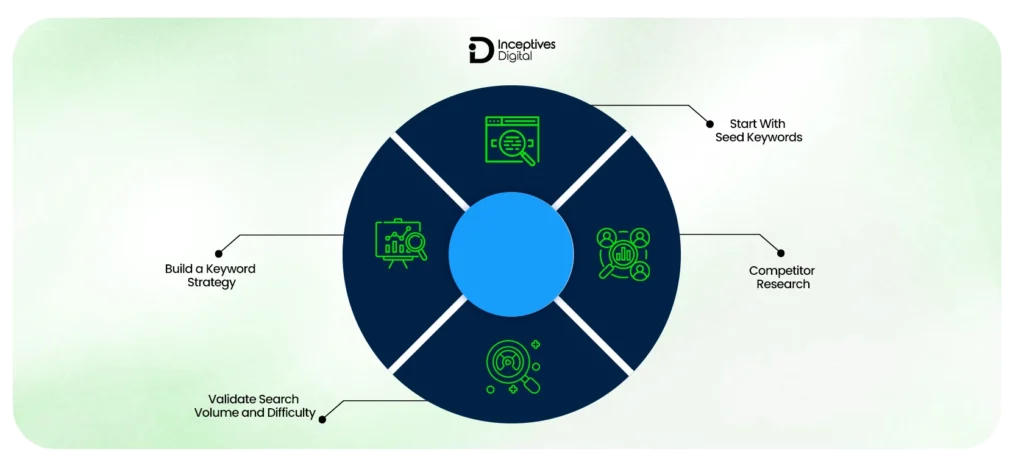
Keyword research is the core element of ASO. Finding the right keywords is only possible through a structured combination of extensive research, analysis, and strategy. Following is a step-by-step method to present your app in front of the right audience.
Step 1 — Start With Seed Keywords
Seed keywords are the starting point for your research. Consider these as the building blocks of your whole keyword strategy. These are the core terms that describe your app or the problem it solves:
- Core app function: The problem statement of your application, for example, “budget tracker”, “photo editor”, etc.
- Problem-based keywords: Common search terms related to your niche, for example, “track expenses”, “edit photos easily”, etc.
Step 2 — Expand Using Competitor Research
Once you are done with finding the right keyword for your niche, analyze what is working for your potential competitors. Here is how you have to do it:
- Reverse engineering competitor rankings: Spot what other keywords your competitors rank for and how they design and list them.
- Identifying keyword gaps: Look for gaps where your app can rank without being dominated by competitors.
This will help you pull up some nice keywords you may have overlooked and keep pace with the competition for your application.
Step 3 — Validate Search Volume and Difficulty
You have to find the keywords that work best for your app, because keywords are not the same. They differ based on some factors. So, below are the important factors you should pay attention to when selecting keywords:
- Search Volume: Number of users searching the term.
- Keyword Difficulty: Competition on a keyword.
- Ranking Probability: The potential of your app to rank for that keyword.
Validation of keywords prevents waste of time, guessing around irrelevant keywords or those that are too competitive in order to rank.
Step 4 — Build a Keyword Strategy That Balances Reach and Intent
Last but not least, you need to strategically structure keywords to bring more visibility and conversions.
- High-volume vs long-tail keywords: High-volume brings more visibility; long-tail brings higher conversion
- Short keywords vs long keywords: Short keywords are competitive; longer phrases often capture intent and niche searches
The goal is to mix visibility and relevance so your app appears in search results and converts users effectively.
Types of Keywords You Should Target in ASO
Different keyword types serve different purposes in app store optimization. A good mix of these keywords together covers search intent, user behaviour, and ranking potential, improving your app’s visibility and discoverability. Here is every type of keyword important for an impactful app optimization strategy.
Primary Keywords (High Traffic, Competitive)
Primary keywords are broad search terms with high search volumes, bringing in the most visibility. These are generally short and very competitive, requiring strong optimization and a longer period to rank for.
Secondary Keywords (Supporting Relevance)
These are supportive terms adding context to the primary keywords. They help ranking algorithms better understand your app to improve your probability of ranking for multiple relevant search queries.
Long-Tail Keywords (Conversion-Focused)
These keywords have the highest conversion intent, but generally have lower search volumes. Users who come through these terms are most likely to install the app, indicating this is a valuable conversion boosting element.
Branded vs Non-Branded Keywords
- Branded keywords are the ones with your app or company’s name included in them, specific for targeting users who are already familiar with your app.
- Non-branded keywords are relevant terms to your niche that help in making your app visible to new users who are looking for solutions similar to your app.
For a robust ASO strategy, you need to strike a balance between attracting new users and retaining existing users.
Trending & Seasonal Keywords
These keywords match current market trends and seasonal patterns of demand and active events. They provide temporary increases in visibility and download rates when applied with the right strategy.
The right approach is using them in the right combination to improve your mobile app visibility simultaneously for broad searches, niche-specific queries, and high-intent users.
How to Do App Store Optimization (Complete Listing Optimization Guide)
Now that we have discussed what ASO really is, how it works, important ranking factors, keyword research, and its types, it is time to apply and align all of these for your mobile app idea to generate more clicks and installs. Let’s start with your title, which is the first impression and most important signal in app store optimization.
App Title Optimization
Your app title is where ASO begins. It’s the first thing both users and the app store algorithm look at, which makes it your strongest ranking signal.
Primary Keyword Placement
Placing your main keyword in the title tells the algorithm exactly what your app should rank for. The closer it is to the beginning, the stronger the signal.
Example:
Instead of: “SpendWise”
Use: “Budget Tracker – SpendWise”
Here, “budget tracker” improves visibility while keeping the brand intact.
Branding vs Discoverability Balance
But ranking alone isn’t enough; a strong mobile app branding is important as well. If your title feels forced, users may ignore it. The goal is to blend keywords with a clean, memorable name.
Example:
- Over-optimized: “Budget Expense Money Tracker Finance App”
- Balanced: “Expense Tracker – SpendWise”
Once your title gets you discovered, the next step is helping users instantly understand your app, which is where the subtitle comes in.
Subtitle and Short Description Optimization
After the title grabs attention, the subtitle or short description reinforces your app’s value and expands your keyword reach.
Supporting Keyword Inclusion
This is where you include secondary keywords to cover more search queries without repeating your main keyword.
Example:
Title: “Budget Tracker – SpendWise”
Subtitle: “Track expenses, save money, and manage bills easily.”
Here, “track expenses” and “manage bills” expand keyword coverage.
Messaging Clarity
This section should clearly explain why the app is worth downloading. Keep it benefit-driven and easy to understand.
Example:
- Weak: “An app for managing finances.”
- Strong: “Track spending, set budgets, and save more every month.”
Now that your visible elements are optimized, the next step is strengthening your reach behind the scenes.
Keyword Field Optimization (iOS)
Unlike the title and subtitle, the keyword field isn’t visible to users, but it plays a key role in indexing your app.
Keyword Structuring
Use this space to include additional keywords that didn’t fit in your visible listing. Focus on variety and relevance.
Example:
expense, money, savings, budget planner, finance tracker
This expands your reach across multiple related searches.
Avoiding Duplication
Don’t repeat keywords already used in your title or subtitle. Use this space to target new variations instead.
Example:
If your title already includes “budget tracker,” don’t repeat it here. Instead, add:
spending, personal finance, bill organizer
When these elements work together, your app doesn’t just rank for more keywords; it also communicates value clearly and converts more users. That’s what turns ASO from basic optimization into real growth.
Writing App Descriptions That Rank and Convert
Your app description does two jobs at once. It helps app stores understand your app through app description optimization, and it convinces users to install through clear, persuasive app listing copy.
The mistake most apps make is focusing on one and ignoring the other. Strong ASO descriptions balance both, starting with visibility.
Optimizing for Search Visibility
Before your description can convert, it needs to support your rankings. That starts with how you use keywords.
Natural Keyword Placement
Keywords should feel like part of the sentence, not forced into it. This improves relevance without hurting readability.
Example:
- Forced: “Best budget tracker app for budget tracking and expense tracking.”
- Natural: “Track your expenses, manage budgets, and take control of your finances in one place.”
Avoid Keyword Stuffing
Repeating the same keyword lowers readability and can hurt performance. Instead, use variations and related terms to improve coverage.
Example:
Instead of repeating “budget tracker,” use variations like:
- expense manager
- finance tracker
- money management app
Once your description is optimized for search, the next step is making sure users can actually read and understand it quickly.
Structuring for Readability and Engagement
Even a well-optimized description won’t work if users don’t read it. Structure plays a big role here.
First Lines Matter Most
The opening lines are what users see before expanding the description. This is where you need to hook attention and communicate value immediately.
Example:
“Take control of your finances in minutes. Track expenses, set budgets, and start saving smarter today.”
Use of Bullet Points
Breaking content into bullet points makes it easier to scan and highlights key features quickly.
Example:
- Track daily expenses effortlessly
- Set monthly budgets and goals
- Get insights into your spending habits
Once your description is easy to read, the final step is making it persuasive enough to drive installs.
Conversion-Focused Copywriting Techniques
This is where your description shifts from informative to convincing.
Benefits Over Features
Users care more about outcomes than technical details. Focus on what they gain, not just what the app does.
Example:
- Feature: “Includes expense tracking tools.”
- Benefit: “Know exactly where your money goes and avoid overspending.”
Social Proof
Adding credibility builds trust and reduces hesitation.
Example:
“Trusted by over 1 million users worldwide.”
or
“Rated 4.8 stars by thousands of users.”
Clear Call to Action
Tell users what to do next. A simple, direct CTA improves conversion.
Example:
“Download now and start managing your finances smarter.”
When your description combines search visibility, clear structure, and persuasive messaging, it doesn’t just help your app rank; it turns visitors into installs.
Visual Optimization — The Biggest Driver of Install Conversion
Once your app starts appearing in search results, visuals decide what happens next. Users don’t read first; they scan. Your app icon, screenshots, and app preview are what make them stop, tap, and install.
This is where app store optimization shifts from visibility to conversion.
1. App Icon Optimization
Your app icon is the first thing users notice. It sets expectations before they even read your app name.
First Impression Factor
A clean, simple icon stands out in crowded search results. Overcomplicated designs get ignored, especially on smaller screens.
Example:
- Weak: cluttered icon with text and multiple elements
- Strong: bold symbol with clear contrast and minimal design
Brand Recognition
A consistent icon helps users recognize your app instantly, especially if they’ve seen it before.
Example:
Using a unique color or symbol consistently across updates builds familiarity and trust over time.
Once your icon gets attention, screenshots take over to explain the value.
2. Screenshot Optimization Strategy
Screenshots are where users decide if your app is worth downloading.
Storytelling Approach
Instead of random screens, your screenshots should follow a flow that explains your app step by step.
Example:
- Show the main benefit (“Track your expenses easily”)
- Show how it works (dashboard view)
- Show the outcome (insights or savings)
Highlighting Key Features
Each screenshot should focus on one core feature with a short caption.
Example:
- “Set monthly budgets in seconds.”
- “Get real-time spending insights.”
Once screenshots build interest, videos can push users over the edge.
3. App Preview Videos
Videos aren’t always necessary, but when used right, they can significantly improve conversion.
When They Increase Conversion
Videos work best for apps with interactions that are hard to explain through static images.
Example:
Apps like fitness trackers, editing tools, or games benefit more from videos than simple utility apps.
Key Elements of High-Performing Videos
- Show value in the first few seconds
- Keep it short and focused
- Highlight real app usage, not just animations
Example:
Start with: “Edit photos in seconds” followed by quick clips of actual editing in action.
Once your visuals are strong, the next step is refining them through testing.
4. A/B Testing Visual Elements
Even small visual changes can impact installs, which is why testing is critical.
Testing Frameworks
Test one element at a time, such as icon variations or different screenshot orders, to clearly measure impact.
Example:
Version A: Blue icon
Version B: Green icon
→ Compare which version gets more installs
Iteration Cycles
ASO is not one-time. Use test results to continuously improve visuals over time.
Example:
If a new screenshot set increases conversion by 10%, keep optimizing further instead of stopping there.
When your visuals are optimized and continuously tested, they don’t just support your ASO strategy. They become the main driver of installs.
How to Increase App Store Optimization Performance Over Time
If you’re looking at how to increase app store optimization, the key is consistency. ASO improves through ongoing updates, not one-time changes. Focus on refining keywords, improving conversion, and building trust.
Continuous Keyword Optimization
Keeping your keywords updated ensures your app stays aligned with changing search queries and continues to expand its reach over time.
Strategies:
- Monitor keyword performance regularly
- Update metadata based on search trends
- Add new keyword variations
- Remove underperforming keywords
Improving Conversion Rates
Optimizing how your listing presents value helps turn more visitors into installs, maximizing the impact of your existing traffic.
Strategies:
- Improve app icon and screenshot design
- Refine app title and description messaging
- Test different visual combinations
- Optimize first impression elements
Increasing Ratings and Reviews
Strong ratings and consistent reviews build trust and improve both ranking signals and user decision-making.
Strategies:
- Prompt users at the right moment
- Encourage satisfied users to leave reviews
- Respond to user feedback
- Use feedback to improve the app
Consistent effort across these areas leads to steady and scalable ASO growth.
Ratings & Reviews — A Critical ASO Ranking Factor
Rating and reviews are one of the key drivers of app store optimization. Strong app rating and user reviews create a trustworthy reputation for your app on the app store. Let’s see how these impact the ASO strategy and how to take full advantage of these for maximum results.
Why Reviews Impact Rankings and Installs
In niches where trust matters the most, app store users prioritize those with good reviews. It boosts the confidence of the user to trust your app, hence increasing install rates. From the app store’s perspective, they are considered ranking signals. The higher your positive feedback is, the higher your chance of getting a higher rank.
Strategies to Get More Positive Reviews
Getting positive reviews requires a balance of smart tactics at the right time when the user is having a great experience with your app. Prompting them for reviews at such times is the best way to collect as many positive feedback as possible. But for creating such moments, you have to maintain a satisfactory and engaging experience through intuitive UI/UX designs to increase the chance of getting a positive review from them.
Handling Negative Reviews Without Hurting Growth
Perfection is something that is not achievable at all; even the top apps get negative reviews, so these don’t matter. What actually matters is how you cope with those situations. You have to be very professional and actively respond to user queries to show you care about their experiences. But only responding to them is not enough. In fact, you have to identify flaws based on reviews and make improvements based on user reviews.
Ratings and reviews management creates positive impacts on your ranking position and business reputation, making it a vital element for achieving sustained success in app store optimization.
App Store Conversion Rate Optimization (CRO)
Conversion rate optimization in ASO focuses on turning app store visitors into installers. By improving how your listing engages users, you maximize the value of your existing traffic and boost overall performance.
What is Conversion Rate in App Store Optimization?
Conversion rate measures how many users install your app after seeing it. It’s the critical metric along the impression → install journey, showing how effective your listing is at convincing potential users.
Key Factors Affecting Conversion
Several elements directly influence your install rate:
- Visual Assets – App icon, screenshots, and preview videos
- Ratings – High ratings and positive reviews build trust
- Messaging – Clear, benefit-focused titles, subtitles, and descriptions
CRO Testing Framework for ASO
Optimization is an ongoing process. Use a simple testing cycle:
- Hypothesis – Identify what change might improve conversion
- Test – Implement variations in visuals or copy
- Analyze – Measure impact on conversion rate
- Iterate – Refine based on results for continuous improvement
Improving CRO ensures your app not only gets discovered but also converts visitors into loyal users efficiently.
ASO Localization — Expanding Beyond One Market
App Store Optimization isn’t limited to one language or region. App localization and multilingual ASO help you reach new users, improve engagement, and drive installs across different markets.
Why Localization Matters
Localization goes beyond translation—it makes your app relevant to local users.
- Increased Discoverability – Localized keywords improve search rankings in each region
- Better User Engagement – Users connect more when content feels native to their language and culture
What to Localize
To succeed in new markets, focus on these key areas:
- Keywords – Translate and adapt keywords for local search behavior
- Descriptions – Localize messaging to match local preferences
- Screenshots – Use culturally relevant visuals and captions
Localization Mistakes to Avoid
Avoid pitfalls that reduce the effectiveness of your localization efforts:
- Direct Translation – Word-for-word translation often misses local context
- Ignoring Cultural Nuance – Colors, icons, and examples may have different meanings in different regions
Effective ASO localization ensures your app resonates globally, expanding reach and increasing installs beyond your primary market.
Advanced App Store Optimization Strategies
Once you’ve mastered the basics, advanced app store optimization strategies focus on gaining an edge through competitor insights, trend adaptation, and continuous listing refinement.
Competitor Analysis and Reverse Engineering
Understanding your competitors helps identify gaps and opportunities to improve your app’s visibility.
Strategies:
- Track competitor keyword rankings regularly
- Analyze top-performing metadata and visuals
- Identify keywords your competitors rank for, but you don’t
- Benchmark conversion rates and user engagement metrics
Leveraging Trends and Seasonality
Aligning your ASO with trending topics or seasonal demand can temporarily boost visibility and installs.
Strategies:
- Target event-based or seasonal keywords
- Adjust visuals and copy to reflect trends
- Monitor social media and industry trends for relevant spikes
- Plan updates around holidays or major events
Metadata Refresh Strategy
Keeping your listing up to date maintains relevance with both users and app store algorithms.
Strategies:
- Update keywords based on search performance
- Refresh descriptions to highlight new features or benefits
- Rotate screenshots and app preview videos periodically
- Schedule regular audits and optimization cycles
These strategies ensure your ASO stays dynamic, competitive, and aligned with evolving user behavior.
App Store Optimization Metrics That Actually Matter
Focusing on the right metrics helps you measure your ASO success accurately after publishing your app on app stores. These performance metrics indicate how well your app is discovered, installs, and retains users.
| Metric | Why It Matters |
| Keyword Rankings | Tracks app visibility in search results and which keywords drive traffic |
| Conversion Rate | Measures how effectively your listing turns impressions into installs |
| Install Volume | Indicates the overall growth and popularity of the app |
| Retention Rate | Shows user quality and engagement over time |
| Uninstall Rate | Highlights product issues and areas for improvement |
Strategies to Track and Optimize These Metrics:
1. Keyword Rankings
- Monitor primary and secondary keyword positions
- Track changes after metadata updates
- Compare with competitor rankings
- Identify high-potential keywords
2. Conversion Rate
- Optimize app icon, screenshots, and preview videos
- Refine title, subtitle, and description copy
- Focus on first impressions and messaging clarity
- Run A/B tests to measure changes
3. Install Volume
- Track organic vs paid installs
- Analyze download trends over time
- Measure the impact of keyword optimization
- Monitor spikes from campaigns or seasonality
4. Retention Rate
- Track 1-day, 7-day, and 30-day retention
- Analyze user behavior and feature usage
- Improve onboarding experience
- Use notifications and updates to boost engagement
5. Uninstall Rate
- Monitor trends after updates
- Identify common reasons from reviews and feedback
- Fix bugs and usability issues promptly
- Track improvements post-changes
By consistently monitoring these metrics, you can ensure your ASO efforts translate into better visibility, higher installs, and stronger user engagement.
How Much Does App Store Optimization Cost?
Understanding how much app store optimization costs helps you plan your overall app development cost and choose the right approach for your app. Costs vary based on the level of effort, tools, and expertise required.
Cost Factors in ASO
Several elements determine your ASO investment:
- Tools – Keyword research, analytics, and tracking platforms ($20–$200/month)
- Agency vs In-House –
- In-house: $500–$2,000/month, depending on resources and team size
- Agencies: $1,000–$5,000/month or project-based fees
- Testing and Iteration – Ongoing A/B testing of visuals, copy, and metadata ($100–$500/month)
Typical Cost Ranges
- DIY Approach – Minimal financial outlay; mainly time and free or low-cost tools ($20–$200/month)
- Professional Services – Comprehensive ASO handled by agencies or specialists ($1,000–$5,000/month)
Is ASO Worth the Investment?
Investing in ASO can yield better ROI than paid ads:
- Organic traffic reduces ongoing ad spend
- Compounding growth over time
- Cost per install is often lower than paid acquisition campaigns
Common ASO Mistakes That Limit App Growth
Even with a solid app store optimization strategy, common errors can hold back your app’s growth. Avoiding these ASO errors ensures your optimization efforts actually translate into installs and user engagement.
Keyword Stuffing
Overloading titles, descriptions, or metadata with keywords can hurt readability and rankings.
Strategies:
- Use keywords naturally
- Focus on relevance and semantic variations
- Avoid repeating the same keyword excessively
Ignoring Visuals
Poor app icons, screenshots, or preview videos reduce conversions regardless of ranking.
Strategies:
- Optimize icons for clarity and recognition
- Use screenshots that highlight key features
- Include preview videos when relevant
Not Updating Listings
Static listings lose relevance over time, limiting keyword performance and discoverability.
Strategies:
- Refresh metadata regularly
- Rotate screenshots and videos periodically
- Adjust keywords based on performance trends
Poor Review Management
Neglecting reviews lowers trust and limits both rankings and conversions.
Strategies:
- Respond to user feedback promptly
- Encourage positive reviews tactfully
- Address negative reviews to improve the app
Treating ASO as One-Time Work
ASO is ongoing. Ignoring continuous optimization reduces long-term results.
Strategies:
- Regularly monitor metrics
- Test visuals and copy
- Update keywords and metadata periodically
Avoiding these mistakes ensures your ASO efforts drive consistent visibility, installs, and app growth.
Step-by-Step App Store Optimization Strategy
To truly understand how to do app store optimization, it helps to break the process into clear, actionable stages. Following a structured approach ensures your app gets discovered, converts well, and grows steadily over time.
Pre-Launch ASO Checklist
Before your app goes live, preparation sets the foundation for success.
Key Actions:
- Conduct comprehensive keyword research
- Analyze competitors’ ASO strategies
- Create optimized assets: app icon, screenshots, preview videos
Launch Phase Strategy
The launch phase determines initial visibility and early user traction.
Key Actions:
- Target high-potential keywords from research
- Generate early reviews and ratings to build credibility
- Ensure listing copy and visuals are polished for maximum impact
Post-Launch Optimization Plan
ASO doesn’t stop after launch. Continuous iteration is crucial for long-term growth.
Key Actions:
- Run regular iteration cycles for metadata, visuals, and keywords
- Scale keyword targeting to expand reach
- Track performance metrics like rankings, conversions, and installs
Following this step-by-step strategy ensures your ASO efforts are structured, measurable, and results-driven.
Conclusion
For a successful mobile app development journey, app store optimization is a must-have element. ASO ensures your app achieves maximum visibility, is easily findable, and converts users effectively. Without focusing on ASO, you will be left behind by your competitors in rankings and getting installs. So avoid common pitfalls that we discussed earlier, and be strategically precise to win a place for your app in the highly competitive market.
You can also leverage trusted mobile application development services in USA to take your app store optimization to the next level, as well as develop an application that aligns with your business goals and user requirements.
CTA SECTION START
cta title: Launch Your App with a Growth-First Strategy
cta des: Get expert support to build and optimize your app for better visibility, higher installs, and long-term growth through effective ASO
cta button: Let’s Build Your App
CTA SECTION END
FAQs About App Store Optimization
ASO, or App Store Optimization, is the process of improving your app’s visibility and conversion in app stores by optimizing keywords, visuals, and listing elements.
ASO works by aligning app metadata, visuals, and user signals with app store algorithms to boost rankings, increase impressions, and convert users into installs.
Start with seed keywords, analyze competitors, validate search volume and difficulty, and build a balanced strategy with high-volume and long-tail keywords.
Focus on optimized titles, descriptions, visuals, ratings, reviews, and continuous testing to improve both visibility and conversion.
ASO reduces dependency on paid ads, drives organic traffic, improves install quality, and supports long-term growth.
Continuously update keywords, enhance visuals and messaging, and encourage positive ratings and reviews to compound ASO performance over time.
Costs vary by approach: DIY tools can cost $20–$200/month, while agencies or professional services range from $1,000–$5,000/month, depending on services and testing needs.
SIDEBAR LIST START
- The Ultimate Guide to App Store Optimization (ASO)
- What Is App Store Optimization and How Does It Work?
- Understanding App Store Ranking Factors (What Actually Moves the Needle)
- How to Search Keywords for App Store Optimization (Step-by-Step)
- Types of Keywords You Should Target in ASO
- How to Do App Store Optimization (Complete Listing Optimization Guide)
- Writing App Descriptions That Rank and Convert
- Visual Optimization — The Biggest Driver of Install Conversion
- How to Increase App Store Optimization Performance Over Time
- Ratings & Reviews — A Critical ASO Ranking Factor
- App Store Conversion Rate Optimization (CRO)
- ASO Localization — Expanding Beyond One Market
- Advanced App Store Optimization Strategies
- App Store Optimization Metrics That Actually Matter
- How Much Does App Store Optimization Cost?
- Common ASO Mistakes That Limit App Growth
- Step-by-Step App Store Optimization Strategy
- Conclusion
- FAQs About App Store Optimization
SIDEBAR LIST END