If you’ve ever been curious about how mobile games look so smooth and polished, chances are they were built using Unity.
Mobile gaming has quickly moved to the center of the industry. According to Statista, the global market is expected to cross $126 billion by 2026, making mobile the largest gaming platform worldwide. For anyone entering this space, Unity stands out as one of the most reliable and powerful tools for mobile game development.
What makes Unity so popular in mobile game development is its balance of simplicity and performance. Its visual editor makes it easier for beginners to get started, while features like real-time rendering, physics simulation, and animation systems handle complex tasks behind the scenes. Combined with C#, mobile game developers can quickly turn mobile game ideas into functional, engaging games.
From simple 2D puzzle games to advanced 3D experiences, Unity supports a wide range of game types. It works just as well for individual developers as it does for a professional mobile game development company building large-scale projects.
As smartphones continue to improve, user expectations are also rising. Developers who learn and adopt Unity today are better prepared to create high-quality games that meet the demands of tomorrow’s players.
Why the Mobile Game Market Is Growing Rapidly?
Over the last ten years, the mobile gaming industry has seen tremendous growth, driven by the increased computing power of phones and the widespread availability of cheap internet access.
Such a trend has created immense opportunities for developing mobile phone games for iPhones and Android devices. There are so many users in the mobile gaming industry that, currently, mobile gaming accounts for around half of total gaming revenue.
The reason is that there has never been a better opportunity to gain users than now. This can be seen in how mobile games have been used, from simple to complex games like RPGs.
Since smartphones have advanced in hardware and applications, both small-time developers and big-time companies can easily see the benefits of developing games for the mobile market. Even if they want to make addictive puzzles or 3D games, the mobile game industry still offers many opportunities for success.
What is Unity? (Quick Overview for Beginners)
Unity is a game engine that allows game developers to create 2D, 3D, and AR/VR games. The user-friendly interface and real-time rendering capabilities make it easy for beginners to get started with Unity. At the same time, it offers powerful features for creating mobile games using Unity 3D.
Unity offers an easy-to-use interface with components such as the scene view, game view, hierarchy view, and inspector, which enable efficient scene organization and creation. All assets, such as game objects, animations, and code, can easily be managed using the Unity mobile game development interface.
Scripting in Unity using C# enables game developers to play with the mechanics, interface, physics, and artificial intelligence of their games. Using Unity for scripting makes it easier to create mobile games using C#.
Moreover, Unity provides many documents and tutorials and, more importantly, an amazing asset store where you can find everything you need to make a mobile game. Be it a simple puzzle or a complicated 3D game, the Unity mobile game development tutorial guide will be by your side.
Why Unity is the Best Choice for Mobile Game Development?
Unity provides cross-platform game development with an unparalleled ability to build games for multiple platforms, such as Android, iOS, and others, with a single project. The platform has the highest scalability and can be used by anyone, whether a beginner or a pro, making Unity the best game development platform.
Unity provides its Asset Store, which contains a variety of resources, including 2D and 3D models, animations, and script assets. This helps in saving time while developing the game.
Unity offers more mobile-oriented capabilities than other engines. This is evident in the comparison of the Unity vs. Godot game engines for mobile development in 2026, where Unity emerges as having better documentation, cross-platform compatibility, and integrated services.
Unity’s flexibility enables developers to implement intricate gaming mechanics, incorporate monetization strategies, and optimize for different devices. This makes the Unity vs. Unreal debate in mobile game development an important issue for studios when choosing the most appropriate game engine.
Who Should Consider Unity Mobile Game Development?
Unity has been established as a tool suitable for a wide range of users, from independent video game creators to large companies. Unity’s features, such as its user-friendly interface and cross-platform compatibility, enable developers to build mobile video games. Independent contractors and even mobile video game companies develop projects for clients using Unity on various devices, including iOS and Android.
Indie Developers and Beginners
Small teams and novices will find the ease of use, C# programming, and ready-to-use assets provided by Unity quite advantageous. All this helps rapidly prototype and test various gaming concepts. Unity mobile game development can be carried out even with restricted financial resources; therefore, it is possible to develop games for both Android and iOS devices.
Studios and Professional Teams
Unity’s scalability makes it an ideal platform for professional collaboration. This is because Unity offers developers an environment where they can simultaneously work on graphical aspects, mechanics, user interface, and physics, allowing them to create complex 2D, 3D, and augmented/virtual reality mobile games.
Freelancers and Game Development Companies
Unity provides freelancers and mobile game development companies the opportunity to create excellent games. This is because Unity is cross-platform, allowing developers to make their projects compatible with both Android and iOS with a single codebase. Developers can deliver high-quality mobile games, ranging from simple to complex 3D titles.
Planning Your Mobile Game
Planning is an essential aspect of developing mobile games with Unity. Some things to consider during the planning phase include selecting the right game idea, determining your potential audience, and establishing the ideal gameplay flow. This planning process will make the development process much easier for you.
Game Idea and Genre
The game’s idea selection becomes the most important factor in this process. The developers must consider where the game will be published, what users require, and how current market trends may affect it. With Unity game creation software, the idea becomes highly significant.
Target Audience and Core Gameplay Loop
The people who play your game will influence its mechanics, difficulty levels, and reward systems. You need to define the game’s core loop to keep players engaged. Unity offers useful software tools to help you prototype and test interactions in the game.
Mobile Game Development Process and Cost
Before creating your mobile game, it is advisable to estimate the time required. Knowing how to create a mobile game with Unity will make it easier for you to create a roadmap for development.
Read more about the mobile game development process to get an in-depth guide related to a game concept and launch.
2D vs 3D Mobile Game Development in Unity
Deciding whether to use 2D or 3D is an important consideration when creating a mobile game in Unity. It all comes down to the complexity involved in designing the game. While a 2D game will be easy to create, a 3D game will provide better immersion for the players.
2D Mobile Games in Unity
Games with two-dimensional graphics require less development; thus, they are ideal choices for beginners. Two-dimensional graphics games include such features as sprites and animations. Games with 2D graphics also require less processing power; therefore, they are better suited for casual and puzzle games.
3D Mobile Games in Unity
3D mobile games offer immersive environments, real physics, and increased interactions. Using Unity 3D mobile game development technology, developers can create complex worlds and characters. They use more power and time to develop and cost a lot.
| Feature | 2D Mobile Games | 3D Mobile Games |
| Complexity | Simple design and mechanics | Complex design and interactions |
| Performance | Runs smoothly on low-end devices | Requires high-performance devices |
| Development Time | Faster to develop | Takes more time |
| Cost | Lower development cost | Higher development cost |
| Graphics | Flat visuals (sprites) | Realistic environments and models |
| Best For | Puzzle, casual, arcade games | RPG, action, and simulation games |
When it comes to 2D and 3D games, it becomes apparent that although 2D games cost less and take less time to develop, 3D games offer greater realism. Both types of games can be created using Unity, depending on the developers’ needs and budget.
Understanding Mobile Platforms: Android vs iOS
Choosing the Android and iOS platforms is an essential step in creating games through Unity. There are different requirements for each of these platforms. Understanding the similarities and differences between Android and iOS game development can help developers create better games and generate revenue.
iOS Game Development
The development of mobile application software for iPhone games involves fewer platforms, hence making it easier. Better performance, enhanced security, and a high likelihood of earning from the app are among the benefits of iOS game app development. The downside is that the app store guidelines are stricter for developers.
Android Game Development
Creating Android games for the mobile platform means developing for devices with varying specifications and screen sizes. Even though this is beneficial, it is imperative that thorough testing be conducted to ensure the applications run well on many devices.
| Feature | iOS Development | Android Development |
| Device Range | Limited (Apple devices only). | Wide range of devices and screen sizes. |
| Performance | Consistent and optimized. | Varies depending on device hardware. |
| Development Ease | Easier optimization. | Requires more testing and adjustments. |
| User Base | Smaller but high-paying users. | Larger global audience. |
| Monetization | Higher in-app purchase revenue. | Higher ad-based revenue potential. |
| App Store Approval | Strict guidelines (Apple App Store). | More flexible (Google Play Store). |
In terms of development, iOS offers greater stability and generates more revenue, but Android game app development has more users. Unity makes it easier for developers to build games that work on both platforms.
Setting Up Unity for Mobile Game Development
A proper setup in Unity is the basis for efficient mobile game development. Having the right Unity configuration ensures optimal performance and minimal hassle. Every step, from installing necessary modules to configuring projects and arranging assets, is significant. A well-structured mobile game project in Unity is key to efficiently managing game elements within the Unity mobile game development environment.
Installing Unity and Required Modules
To create a Unity mobile application, one should first install Unity Hub, which manages versions and projects. You will be required to install the Unity LTS version. During installation, one needs to install certain modules that are required for building games on the mobile platform, such as:
- Android Build Support (SDK, NDK, OpenJDK)
- iOS Build Support (only for macOS)
Project Configuration and Settings
After successfully installing Unity, a project must be created in accordance with the game’s 2D or 3D mode. It should be noted that some project settings need to be adjusted to improve the game’s performance.
The following settings matter:
- Orientation of the screen (either portrait or landscape)
- Resolution and aspect ratio
- Graphics quality and performance
Asset Management and Workflow Setup
Organizing assets is important in Unity mobile game development. Setting up folders will make it easier for you to develop your project. Some folders that need to be made are:
- Scripts
- Sprites/Models
- Audio
- Prefabs
Using Unity’s Hierarchy and Inspector features makes it easy to manage game objects.
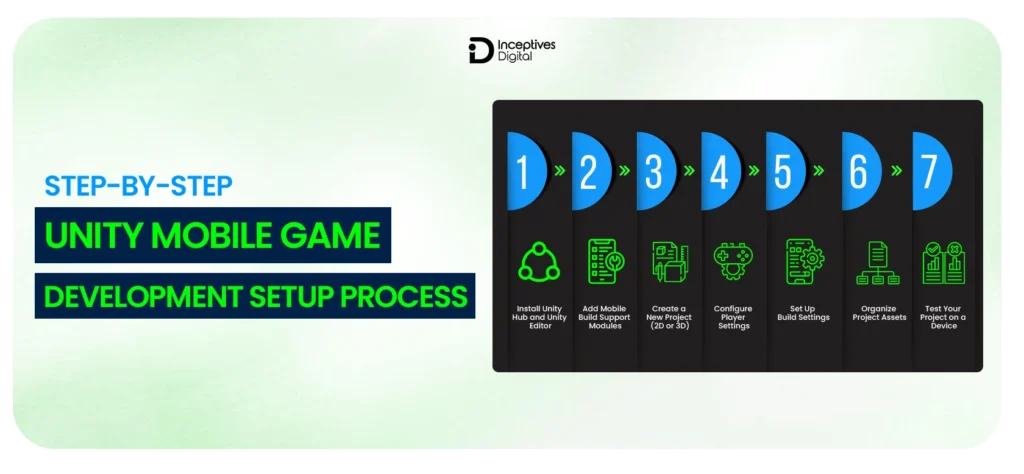
Step-by-Step Unity Mobile Game Development Setup Process
Proper installation of Unity can guarantee that everything starts right from the beginning when developing your mobile games. The proper setup process will help you avoid technical problems, improve your workflow, and save development time. This will help both newbies and experts to set up Unity for mobile game development.
Install Unity Hub and Unity Editor
Install Unity Hub by downloading it from the website and installing it on your computer. Unity Hub lets you navigate between different Unity versions and projects effortlessly. Download the latest LTS version, which is dependable and widely used for mobile apps.
Add Mobile Build Support Modules
During installation, ensure you select the required modules, such as Android Build Support (SDK, NDK, OpenJDK) and iOS Build Support (if you are using a Mac). The modules listed above have to be installed because they will help you develop, debug, and deploy your game on mobile devices.
Create a New Project (2D or 3D)
Open the Unity Hub application and begin creating a new project. It is up to you whether you would like your game to be created in 2D or 3D space. The project name and its correct location must also be defined here.
Configure Player Settings
Now move to the Player Settings tab, where you can configure settings such as orientation (portrait or landscape), screen resolution, company name, and package identifier. These will help you design your product and prepare it for distribution and testing across different devices.
Set Up Build Settings
Go to Build Settings and choose the required platform (Android or iOS). Hit “Switch Platform.” Adjust other parameters, such as the minimum API level on Android, or link with Xcode on iOS.
Organize Project Assets
Organize your assets into folders like Scripts, Sprites/Models, Audio, and Prefabs to work efficiently within your project. The organization of your folders enables easier workflows and makes it easy to find assets even when working on projects in groups.
Test Your Project on a Device
Testing of your app can be done using the Build and Run feature. It enables you to see how your game’s performance is. You will identify any bugs and other performance issues.
Designing Game Mechanics and Player Controls
The mechanics of a game establish the basic components and rules. Perhaps the best way to start is with basic mechanics that are simple yet interesting enough for players to learn. Good examples of game mechanics include actions, rewards, progression, and repetition. Giving players options will help them become more immersed in the game.
The game mechanics determine how the game is played and understood through its interactions. Instead of packing in too much content, the developers should focus on refining a few key functions.
Excellent gameplay loops create the illusion of progress, motivating the gamer to keep playing. The gamer receives immediate feedback through visual cues, sound effects, and even scores for the repercussions of their actions. Conversely, giving the gamer autonomy and choice empowers them to control the game world.
Publishing Your Mobile Game
Publishing is the final phase that turns your project into an actual product. To publish Unity game builds, developers need to create separate versions for Android and iOS in Unity’s build settings. When developing mobile games for Android phones, the APK or AAB file is uploaded to the Google Play Store. For developing mobile games for iPhones, the export process will be done in Xcode.
Before submitting, it is crucial to have a guide on how to properly develop a mobile game in Unity, including creating store listings. App names, descriptions, images, and icons should be included during the process. The significance of App Store Optimization (ASO) lies in making an application more visible through keywords and visuals.
Testing is just as important for publishing. The developers need to ensure the game works well across various hardware types and software versions. This helps ensure stability and game optimization, improving its likelihood of approval and player enjoyment.
Monetization and Marketing Strategies
Successful mobile gaming monetization enables the game to generate revenue without boring players. The different ways of earning from the game include advertising, in-game purchases, and subscription fees, and these may depend on the game’s nature.
Marketing is an important aspect that helps you attract more players and retain them. Marketing efforts such as pre-launch marketing, social media marketing, growth hacks, and using influencers can help increase your visibility and downloads.
Regularly engaging your target audience with updates and rewarding them can increase their app usage.
Final Thoughts
Unity provides a comprehensive platform for creating mobile video games, guiding you from concept to delivery. Its impressive set of functions and utilities enables the creation of compelling games that deliver a rich visual experience. But designing a successful video game is not the end goal; proper monetization and marketing strategies must also be considered. The involvement of a mobile game development company can also optimize the development process. Finally, providing a great user experience is crucial to sustaining their interest.
CTA SECTION START
cta title: Ready to turn your game idea into reality?
cta des: Mobile game development with Unity helps you build and launch faster. Partner with Inceptives Digital to create, scale, and succeed in today’s growing market.
cta button: Let’s Connect
CTA SECTION END
FAQs
Start by installing Unity Hub and the latest LTS version. Set up your project, choose 2D or 3D, and begin with simple gameplay mechanics. Learning basic C# Scripting and following a structured Unity mobile game development guide will help you get started quickly.
Yes, Unity is one of the best engines for mobile games due to its cross-platform support, user-friendly interface, and powerful tools. It allows developers to build games for both Android and iOS with a single codebase.
The cost of mobile game development depends on game complexity, features, and design. A simple game may cost $5,000–$20,000, while advanced 3D games can exceed $50,000. Costs also vary if you hire a mobile game development company for professional services.
Development time can range from a few weeks for simple games to several months for complex projects. Factors like game type, features, team size, and testing requirements affect the overall mobile game timeline.
Yes, Unity supports cross-platform development, allowing you to publish your game on both the Google Play Store and Apple App Store. You just need to configure submission-specific settings and follow each store’s submission guidelines.
SIDEBAR LIST START
- Introduction to Mobile Game Development with Unity
- Why the Mobile Game Market Is Growing Rapidly
- What is Unity? (Quick Overview for Beginners)
- Why Unity is the Best Choice for Mobile Game Development
- Who Should Consider Unity Mobile Game Development?
- Planning Your Mobile Game
- 2D vs 3D Mobile Games in Unity
- Understanding Mobile Platforms: Android vs iOS
- Setting Up Unity for Mobile Game Development
- Step-by-Step Unity Mobile Game Development Setup Process
- Designing Game Mechanics and Player Controls
- Publishing Your Mobile Game
- Monetization and Marketing Strategies
- Final Thoughts
- FAQs
SIDEBAR LIST END