Let’s face it-the app stores are basically a digital graveyard. With over a thousand options screaming for attention, even the tiniest glitch can send users running to your competitors. I mean, who hasn’t rage-deleted an app after one too many crashes? Research shows 63% of people will jump ship after just one crappy experience-and that number is climbing fast (up 9% from last year alone).
Ideas are not always the culprit in a mobile app failure. Majorly, the reasons are basic mobile app development mistakes that can be avoided with better execution and precautions. Research shows that approximately 1 out of 4 mobile apps downloaded are used only once before being abandoned. It shows the fragile user behaviour that instantly rejects the app that fails to please them.
The development process from planning to launch requires precise planning and expertise. Beginners or small teams with fewer resources face difficulties in handling everything expertly. This is why businesses collaborate with an experienced mobile app development company to build state-of-the-art apps that enhance their business operations. They are well aware of common mobile app development mistakes that usually lead to app failures.
To help you out in your development journey, this guide features the common mobile app development mistakes that almost every team faces and practical tips to avoid them to ensure a secure and reliable mobile app.
Key Mobile App Development Mistakes Covered in This Blog:
- UX mistakes
- Performance issues
- Security flaws
- MVP and planning mistakes
- Testing and QA gaps
- Marketing mistakes
Mistake #1: Skipping the Discovery Phase and MVP Validation
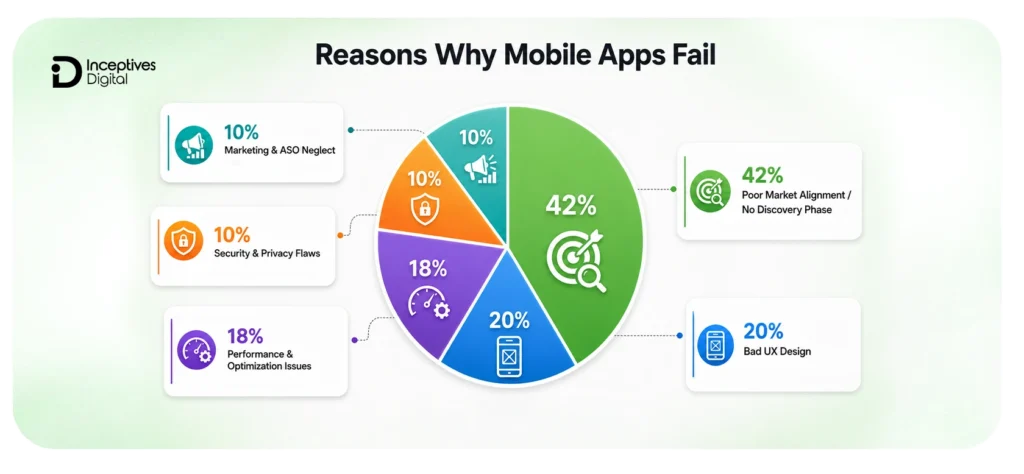
One of the most common mobile app development mistakes is starting development without proper planning, market validation, or a Minimum Viable Product (MVP) development.
Many apps fail because teams rush into design and development without clearly understanding user pain points, market demand, or long-term business goals. This often results in wasted development costs, feature confusion, and poor user adoption after launch.
Without a structured discovery phase, businesses may struggle with:
- Unclear app requirements
- Unrealistic timelines and budgets
- Poor feature prioritization
- Scalability issues later in development
Skipping MVP validation creates even bigger risks. Instead of testing a simplified version of the product first, many businesses invest in full-scale development before confirming whether users actually need the app.
According to CB Insights, 43% of startups fail because there is no real market need for their product, making validation one of the most important early-stage development steps.
How to Avoid This Mistake
Before development begins, focus on research, validation, and strategic planning.
Best Practices Include:
- Conduct market and competitor research
- Define clear user pain points and goals
- Build an MVP with only core features
- Test usability with real users early
- Collect feedback before scaling the app
- Use agile sprints for continuous improvements
An MVP helps businesses launch faster, reduce app development costs, and identify usability problems before investing in large-scale development.
A well-planned discovery phase also improves project management, feature prioritization, scalability, and long-term product stability.
Mistake #2: Poor UI/UX Design in Mobile Apps
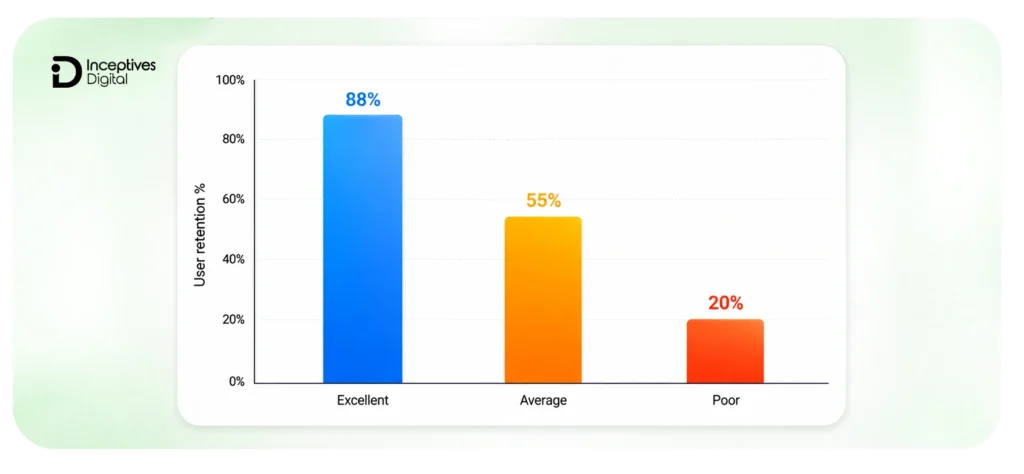
Even a feature-rich mobile app can fail if users find it confusing, slow, or difficult to navigate. Poor user experience is one of the biggest reasons why mobile apps lose users shortly after installation.
Modern users expect mobile apps to be fast, intuitive, and easy to use from the very first interaction. A cluttered interface, complicated onboarding process, or inconsistent design can quickly increase uninstall rates and reduce engagement.
Common UI/UX mistakes include:
- Confusing navigation flows
- Slow or unresponsive screens
- Inconsistent UI across devices
- Overcrowded interfaces
- Poor onboarding experiences
- Lack of accessibility support
Research shows that users form an opinion about an app within seconds, making first impressions critical for user retention and long-term engagement.
How Poor UI/UX Impacts Mobile Apps
Weak UI/UX design can lead to:
- Lower user retention
- Increased uninstall rates
- Poor app store reviews
- Reduced session duration
- Lower conversion and engagement rates
Even small usability issues can negatively affect app performance and customer satisfaction.
How to Avoid This Mistake
Improving user experience requires continuous testing, feedback, and performance optimization throughout the development process.
Best Practices Include:
- Create simple and intuitive navigation
- Keep the interface clean and consistent
- Optimize loading speed and responsiveness
- Reduce unnecessary user steps
- Conduct usability testing regularly
- Collect and implement user feedback
- Ensure accessibility across devices and screen sizes
Using tools like Figma, Adobe XD, and user behavior analytics can help teams identify friction points early and improve usability before launch.
There is a significant role of UI/UX design in improving retention, engagement, building trust, and long-term app success.
Mistake #3: Poor App Architecture and Scalability Planning
One of the most overlooked mobile app development mistakes is building an app without a scalable architecture.
Many apps perform well during the early stages but begin facing performance issues, crashes, and slow updates as the number of users and features grows. Poor architectural decisions can make future development more expensive, complicated, and difficult to maintain.
Without proper scalability planning, mobile apps often experience:
- Slow loading and performance bottlenecks
- Difficulty handling increased traffic
- Unstable backend integrations
- Complicated feature updates
- Higher long-term maintenance costs
- Increased security vulnerabilities
Apps with weak architecture may also struggle to support future technologies, integrations, or expansion plans.
Why Scalability Matters
Scalability ensures that your app can grow smoothly without affecting performance or user experience.
A scalable app architecture helps:
- Support more users efficiently
- Improve long-term app stability
- Simplify future feature updates
- Reduce development and maintenance costs
- Improve backend reliability and performance
Ignoring scalability early in development often leads to expensive restructuring later.
How to Avoid This Mistake
To build scalable and maintainable mobile applications, developers should focus on architecture planning from the beginning.
Best Practices Include:
- Use scalable architecture patterns like MVC or MVVM
- Build modular components for easier updates
- Design backend systems for future growth
- Use reliable APIs and cloud infrastructure
- Conduct regular architecture reviews
- Implement version control and documentation properly
Choosing the right architecture early helps improve app performance, flexibility, and long-term scalability while reducing technical debt.
Mistake #4: Ignoring Mobile App Performance Optimization
Performance issues are one of the fastest ways to lose mobile app users. Even a well-designed app can fail if it loads slowly, crashes frequently, or feels unresponsive during use.
Modern users expect mobile apps to deliver fast and seamless experiences across all devices. Delays of even a few seconds can increase bounce rates, reduce engagement, and negatively impact app store rankings.
Common mobile app performance issues include:
- Slow loading times
- App crashes and freezes
- Excessive battery consumption
- Memory leaks
- Laggy animations and transitions
- Poor backend response times
Apps with poor performance often struggle with user retention and long-term engagement.
Why Performance Optimization Matters
Mobile app performance directly affects:
- User satisfaction
- Retention rates
- Session duration
- App store reviews
- Conversion and revenue potential
Research consistently shows that users are far more likely to uninstall apps that feel slow or unstable. Performance optimization also improves scalability and reduces long-term maintenance problems.
How to Avoid This Mistake
Mobile app performance optimization should be part of the entire development lifecycle, not just a post-launch task.
Best practices include:
- Optimize app assets and image sizes
- Reduce unnecessary animations and background processes
- Monitor memory usage and fix memory leaks
- Improve backend and API response times
- Test performance across multiple devices and OS versions
- Use analytics tools to monitor crashes and slow screens
- Conduct regular performance audits after updates
Tools like Firebase Performance Monitoring and Mixpanel can help identify bottlenecks and improve real-world app performance. A fast and responsive app improves user experience, increases retention, and strengthens long-term app growth.
Mistake #5: Ignoring Mobile App Security and Privacy
Security and privacy are critical factors in mobile app success. Even a highly functional app can lose users quickly if people do not trust how their data is handled.
One of the most serious mobile app development mistakes is treating security as a secondary priority instead of integrating it throughout the mobile app development process.
Mobile apps often collect sensitive information such as:
- Personal details
- Payment information
- Location data
- Login credentials
- Health or business-related data
Without proper security measures, the app becomes vulnerable to breaches, unauthorized access, and cyberattacks.
Common security mistakes include:
- Weak authentication systems
- Poor password protection
- Unsecured APIs
- Excessive permission requests
- Lack of data encryption
- Storing sensitive data insecurely
Security failures can damage user trust, reduce retention, and lead to legal or compliance issues.
Why Mobile App Security Matters
Strong security practices help:
- Protect user data and privacy
- Improve user trust and credibility
- Reduce the risk of cyberattacks
- Support compliance with regulations like GDPR and CCPA
- Prevent financial and reputational damage
Users are more likely to continue using apps that clearly prioritize privacy and data protection.
How to Avoid This Mistake
Security should be integrated into every stage of the mobile app development process.
Best practices include:
- Use secure authentication methods like OAuth or biometric login
- Encrypt sensitive data during storage and transmission
- Request only necessary device permissions
- Secure APIs and third-party integrations
- Conduct regular security audits and vulnerability testing
- Keep libraries and frameworks updated
- Monitor suspicious activity and potential threats
Developers should also follow platform-specific security guidelines for both Android and iOS app development.
A proactive security strategy improves user confidence and helps maintain long-term app reliability.
Mistake #6: Choosing the Wrong Platform or Development Approach
Selecting the wrong development approach is one of the most common mobile app development mistakes businesses make early in the project.
Many apps struggle with performance, scalability, or maintenance issues because the platform strategy was chosen based only on budget or speed instead of long-term business goals and user experience.
Before development begins, businesses must decide between:
- Native app development
- Hybrid development
- Cross-platform app development
Each approach has different advantages, limitations, and performance implications.
Choosing the wrong option can lead to:
- Poor app performance
- Inconsistent user experience across devices
- Higher long-term development costs
- Slower updates and maintenance
- Scalability limitations
- Unnecessary development complexity
A poor platform decision can affect the app throughout its entire lifecycle.
Native vs Cross-Platform Development
Native app development typically offers:
- Better performance
- Smoother user experience
- Stronger device integration
- Higher responsiveness
Cross-platform frameworks like Flutter and React Native help:
- Reduce development time
- Lower initial development costs
- Simplify multi-platform deployment
- Speed up updates and maintenance
The right choice between native vs cross-Platform app development depends on your app goals, target audience, scalability requirements, and available budget.
How to Avoid This Mistake
Before selecting a development approach, businesses should evaluate both technical and business requirements carefully.
Best practices include:
- Identify your target audience and preferred devices
- Define performance and scalability expectations
- Compare native and cross-platform limitations
- Test prototypes before full-scale development
- Consider long-term maintenance and update costs
- Choose frameworks that match your app requirements
- Align platform decisions with future growth plans
Popular frameworks like Flutter, React Native, and Xamarin can work well for many projects, but not every app benefits from the same approach.
Choosing the right platform strategy early helps improve app stability, performance, scalability, and long-term user experience.
Mistake #7: Inadequate Mobile App Testing & Quality Assurance
Even a well-designed mobile app can fail if users encounter bugs, crashes, or inconsistent performance. One of the most damaging mobile app development mistakes is releasing an app without proper mobile app testing and quality assurance.
Users expect apps to work smoothly across different devices, screen sizes, operating systems, and network conditions. Even minor technical issues can lead to poor reviews, reduced engagement, and higher uninstall rates.
Common testing and QA issues include:
- App crashes and bugs
- Inconsistent behavior across devices
- Broken features after updates
- Slow performance under heavy usage
- Compatibility issues with OS versions
- Network and API failures
Without proper mobile app testing and quality assurance, small technical problems can quickly affect user trust and app store ratings.
Why Testing and QA Matter
A strong testing strategy helps:
- Improve app stability and reliability
- Reduce crashes and performance issues
- Improve user satisfaction and retention
- Identify bugs before launch
- Reduce long-term maintenance costs
Apps that undergo consistent testing generally provide smoother user experiences and stronger long-term performance.
How to Avoid This Mistake
Testing should be integrated throughout the entire mobile app development lifecycle instead of being treated as a final-stage task.
Best practices include:
- Perform unit, integration, and usability testing
- Test apps across multiple devices and operating systems
- Use both automated and manual testing methods
- Monitor crashes and bug reports continuously
- Test app performance under different network conditions
- Validate backend integrations and APIs regularly
- Conduct regression testing after updates and feature releases
Tools like Firebase Crashlytics and BrowserStack can help teams identify technical issues early and improve app reliability.
A strong QA process helps deliver stable, high-performing mobile applications while improving user trust and retention.
Mistake #8: Neglecting App Store Optimization (ASO)
Even a well-designed mobile app can struggle to gain traction if users cannot easily discover it in the app stores. One of the most common mobile app development mistakes is ignoring App Store Optimization (ASO).
ASO plays a major role in improving app visibility, downloads, and long-term user acquisition. Without proper optimization, mobile apps often get buried under thousands of competing apps on the Google Play Store and Apple App Store.
Poor ASO can lead to:
- Low app visibility in search results
- Fewer organic downloads
- Weak user engagement
- Lower app store rankings
- Missed revenue opportunities
An app with strong functionality but weak discoverability may still fail to attract and retain users.
Why App Store Optimization Matters
App Store Optimization helps improve:
- App discoverability
- Organic traffic and downloads
- User trust and credibility
- App store rankings
- Long-term user acquisition
Research shows that a large percentage of users discover new apps directly through app store searches, making ASO a critical growth strategy for mobile applications.
How to Avoid This Mistake
ASO should be treated as an ongoing optimization process instead of a one-time setup.
Best practices include:
- Use relevant keywords naturally in app titles and descriptions
- Create high-quality screenshots and preview visuals
- Write clear and compelling app descriptions
- Encourage positive user ratings and reviews
- Optimize app metadata for different regions and languages
- Monitor app performance and keyword rankings regularly
- Update listings after major feature releases or improvements
Localization and continuous optimization can significantly improve visibility in competitive app categories.
Strong ASO strategies also support broader mobile app marketing efforts by increasing discoverability, improving engagement, and driving more qualified installs.
Mistake #9: Weak Mobile App Marketing Strategy
Building a high-quality mobile app is only part of the process. Without a strong marketing strategy, even well-designed apps can struggle to gain visibility, downloads, and long-term user engagement.
One of the most common mobile app development mistakes is focusing entirely on development while ignoring user acquisition and app promotion.
Many apps fail because users never discover them, especially in highly competitive categories within the Google Play Store and Apple App Store.
Weak app marketing can lead to:
- Low app visibility
- Poor user acquisition
- Limited user engagement
- Fewer downloads and installs
- Reduced monetization opportunities
- Weak brand awareness
Without proper promotion, even feature-rich apps may struggle to build momentum after launch.
Why Mobile App Marketing Matters
A strong marketing strategy helps:
- Attract the right target audience
- Increase app downloads and visibility
- Improve user retention and engagement
- Strengthen brand awareness
- Support long-term app growth
Pre-launch and post-launch marketing both play an important role in overall app success.
Apps promoted before launch often generate stronger initial traction, user feedback, and app store performance.
How to Avoid This Mistake
Mobile app marketing should begin before development is completed and continue after launch.
Best practices include:
- Create pre-launch landing pages and teaser campaigns
- Use social media and influencer marketing to build awareness
- Combine marketing efforts with App Store Optimization (ASO)
- Run targeted paid advertising campaigns
- Use email marketing to engage and retain users
- Monitor user acquisition and retention metrics regularly
- Adjust campaigns based on analytics and user feedback
Content marketing, app reviews, and community engagement can also help improve long-term visibility and user trust.
Planning your mobile app marketing cost early also helps businesses allocate budgets effectively across paid ads, influencer campaigns, ASO, and long-term user acquisition strategies.
Mistake #10: Neglecting Post-Launch Maintenance
Launching a mobile app is not the end of the development process. One of the most common mobile app development mistakes is ignoring post-launch maintenance after the app goes live.
Without regular updates, performance monitoring, and bug fixes, even successful apps can gradually lose users, rankings, and credibility.
Mobile apps require continuous maintenance to stay compatible with new operating systems, devices, security standards, and evolving user expectations.
Neglecting post-launch maintenance can lead to:
- Unresolved bugs and crashes
- Slower app performance over time
- Compatibility issues with new devices and OS updates
- Reduced user retention and engagement
- Lower app store ratings and reviews
- Increased security vulnerabilities
Apps that are not actively maintained often struggle to remain competitive in the long run.
Why Post-Launch Maintenance Matters
Ongoing maintenance helps:
- Improve app stability and performance
- Fix technical issues quickly
- Strengthen user trust and satisfaction
- Support long-term user retention
- Improve app security and reliability
- Keep the app optimized for modern devices and platforms
Regular updates also show users that the app is actively supported and continuously improving.
How to Avoid This Mistake
Post-launch maintenance should be treated as an ongoing part of the mobile app development process.
Best practices include:
- Release regular updates and bug fixes
- Monitor crashes, load times, and app performance
- Collect and implement user feedback
- Maintain compatibility with new OS versions and devices
- Perform regular security updates and audits
- Track analytics and user engagement metrics
- Use version control for smoother feature rollouts and rollback management
Continuous monitoring and optimization help businesses improve user experience while reducing churn and long-term maintenance costs.
A proactive maintenance strategy keeps mobile apps stable, secure, and competitive in a rapidly evolving market.
How to Avoid These Mobile App Development Mistakes?
Building a successful mobile app is not about avoiding one major failure. It is about consistently making the right decisions throughout the entire development lifecycle, from planning and design to testing, launch, and publishing your app on app stores.
One of the smartest ways to reduce risks early is to validate your mobile app idea through market research, competitor analysis, and real user feedback. Validation helps businesses understand market demand, identify user pain points, and avoid investing in features that may not deliver long-term value.
To build a scalable and successful mobile application, focus on:
- Defining clear business goals and user requirements
- Creating an MVP before full-scale development
- Prioritizing UI/UX design and app usability
- Building scalable architecture and reliable backend systems
- Optimizing app performance across devices
- Implementing strong security and privacy practices
- Conducting regular testing and quality assurance
- Investing in App Store Optimization (ASO) and marketing strategies
- Monitoring analytics, user behavior, and app performance after launch
Using a structured mobile app development strategy helps businesses reduce costly errors, improve user retention, and create better long-term growth opportunities.
Apps that continuously evolve based on user feedback, performance monitoring, and market trends are far more likely to succeed in competitive app marketplaces.
Conclusion
Most mobile apps don’t really fall apart because of one big mistake. It’s usually a chain of small decisions that don’t hold up once real users start interacting with the product. What looks fine in planning or development often behaves very differently in production, especially when traffic, devices, and expectations start scaling together.
At that point, execution matters more than ideas. If you’re planning to build or improve an app, getting the right mobile app development services can help you avoid a lot of rework later and keep things aligned with what users actually need instead of what looks good on paper.
CTA SECTION START
cta title: Launch a Mobile App That Won’t Need Constant Fixes
cta des: Avoid common development mistakes by setting a strong foundation for design, speed, and growth early on.
cta button: Plan Your App Properly
CTA SECTION END
FAQs
1. What is the average mobile app development cost?
The mobile app development cost depends on factors like features, design complexity, platform choice, and backend requirements. A simple app may cost significantly less, while feature-rich applications with advanced integrations and scalability needs require a higher budget. Custom requirements and ongoing maintenance also influence the overall cost.
2. How long does mobile app development take?
The mobile app development timeline varies based on complexity and scope. A basic app may take a few weeks to a couple of months, while more complex applications with advanced functionality, testing cycles, and integrations can take several months or longer. Proper planning and MVP development can help speed up the process.
3. What are the most common mobile app development mistakes?
Some of the most common mistakes include skipping the MVP phase, poor UI/UX design, weak app architecture, ignoring performance optimization, lack of security planning, and insufficient testing before launch. Marketing and post-launch maintenance are also often overlooked.
4. Why is App Store Optimization (ASO) important?
ASO helps improve your app’s visibility in app stores, which directly impacts downloads and user acquisition. Without proper optimization, even a well-designed app may struggle to reach its target audience and gain traction in competitive marketplaces.
5. Why is post-launch maintenance important for mobile apps?
Post-launch maintenance ensures that the app continues to perform well after release. Regular updates, bug fixes, performance monitoring, and security improvements help maintain user satisfaction, improve retention, and keep the app compatible with new devices and operating systems.
SIDEBAR LIST START
- Introduction
- Mistake #1: Skipping the Discovery Phase and MVP Validation
- Mistake #2: Poor UI/UX Design in Mobile Apps
- Mistake #3: Poor App Architecture and Scalability Planning
- Mistake #4: Ignoring Mobile App Performance Optimization
- Mistake #5: Ignoring Mobile App Security and Privacy
- Mistake #6: Choosing the Wrong Platform or Development Approach
- Mistake #7: Inadequate Mobile App Testing & Quality Assurance
- Mistake #8: Neglecting App Store Optimization (ASO)
- Mistake #9: Weak Mobile App Marketing Strategy
- Mistake #10: Neglecting Post-Launch Maintenance
- How to Avoid These Mobile App Development Mistakes?
- Conclusion
- FAQs
SIDEBAR LIST END