An app has just a few seconds to leave a lasting impression on a user who has just opened it for the first time. Because within seconds, they already come to a conclusion about its aesthetics, usability, and if it is worth keeping. Google’s UX research findings state that a user takes only 7 seconds to form a visual opinion.
Regardless of the industry, be it a wellness platform, a banking app, a logistics tool, or simply mobile game development, the successful applications are those that provide the easiest and most natural user experience. UI and UX design together define how an app looks, feels, and functions. While UI focuses on visual elements like layout, colors, and typography, UX ensures that every interaction feels smooth, logical, and effortless. When both are well executed, users don’t need instructions. They naturally understand how to navigate and complete actions.
That is the reason why businesses put their trust in a proficient mobile app development company to develop mobile apps that meet and live up to the expectations of real users. A really good concept might attract people, but an excellent user experience will be what retains them.
In case you are curious to witness the impact of UI/UX design on mobile apps’ performance, just continue reading. The blog guides you through all the factors that really lead to an app’s success.
Understanding UI and UX in Mobile Apps
Before diving into why UI/UX matters, it’s important to understand what these two terms actually mean. They are often used together, but they focus on different parts of the mobile app experience.
UI (User Interface)
UI refers to everything a user sees and interacts with on a mobile app. It is the visual layer that shapes first impressions and guides attention across the screen.
It includes:
- Layout and screen structure
- Colors, typography, and spacing
- Buttons, icons, and visual elements
- Consistency across screens
UI is mainly about presentation. It defines how polished, modern, and visually appealing an app looks when a user opens it.
UX (User Experience)
UX focuses on how a user interacts with the app and how smooth that journey feels. It is less about appearance and more about usability, flow, and logic.
It includes:
- Navigation and app structure
- How easily users complete tasks
- Clarity of steps and user flow
- Speed, responsiveness, and feedback
- Overall ease of use
UX is about experience. It determines whether users feel comfortable or confused while using the app.
How UI and UX Work Together?
UI and UX are closely connected and cannot deliver strong results in isolation. A visually attractive app with poor usability still frustrates users. At the same time, a highly functional app with weak visuals may fail to capture attention or trust.
Successful mobile apps combine both:
- UI to create a strong first impression
- UX to ensure smooth and effortless interaction
When both are aligned, users don’t need instructions. They naturally understand how to navigate, interact, and complete actions inside the app.
How UI/UX Design Impacts Mobile App Performance?
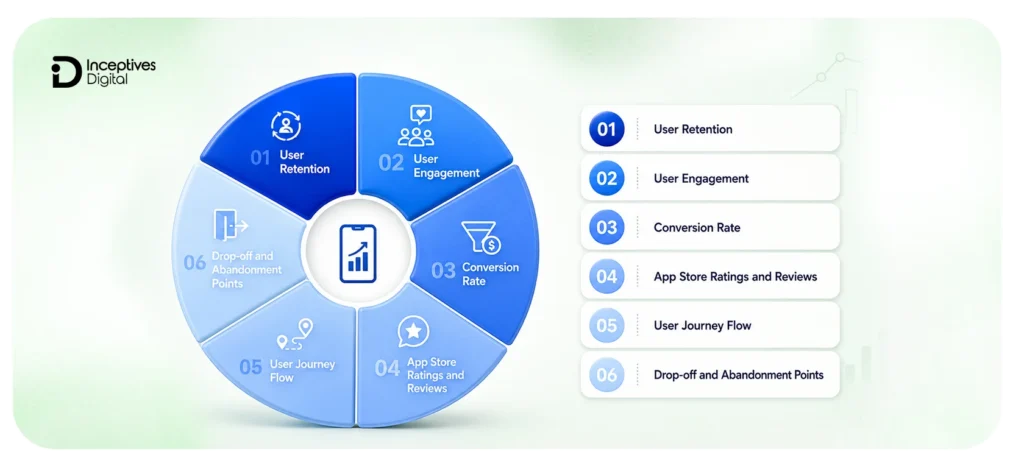
UI/UX design directly influences how users interact with a mobile app and whether they continue using it after the first few sessions. It affects not just usability, but also key business metrics like retention, engagement, and conversions.
In most cases, users don’t explicitly judge an app based on its features alone. They respond to how smooth the experience feels while using those features. That is where UI/UX plays a critical role in shaping performance.
1. User Retention
Retention is one of the most important indicators of app success. If users find an app easy to navigate and consistent in behavior, they are more likely to return.
Poor UI/UX creates friction during early usage, which often leads to uninstallations within the first few days. On the other hand, a well-structured experience builds familiarity, making users more comfortable over time.
2. User Engagement
Engagement reflects how actively users interact with an app. Good UI/UX encourages users to explore more screens, complete more actions, and spend longer sessions within the app.
When navigation feels intuitive, and interactions are smooth, users naturally spend more time engaging with features instead of trying to understand how things work.
3. Conversion Rate
UI/UX has a direct impact on conversions, whether it’s sign-ups, purchases, or form submissions.
Even small friction points like unclear buttons, confusing layouts, or too many steps in a process can reduce conversions. A simplified and well-structured flow helps users complete actions without hesitation.
4. App Store Ratings and Reviews
User experience strongly influences app store feedback. Users who struggle with navigation or face repeated usability issues are more likely to leave negative reviews.
In contrast, apps with clean interfaces and smooth interactions tend to receive higher ratings, which also improves visibility in app stores.
5. User Journey Flow
Every mobile app is built around a series of user journeys, such as onboarding, browsing, searching, or completing a purchase.
UI/UX design ensures these journeys feel logical and uninterrupted. When the flow is confusing or inconsistent, users often abandon the process midway.
6. Drop-off and Abandonment Points
One of the clearest indicators of poor UI/UX is when users stop interacting with the app.
If users frequently exit during onboarding, checkout, or navigation steps, it usually signals friction in the design. Identifying and improving these points can significantly improve overall app performance.
Real-World Examples of Effective UI/UX Design in Mobile Apps
Understanding UI/UX becomes easier when we look at how successful apps apply these principles in real products. Most high-performing apps don’t rely on complex design; they focus on clarity, simplicity, and smooth user flow.
1. Spotify
Spotify uses a clean interface and highly personalized recommendations to keep users engaged. The onboarding process is simple, and users can start listening to content almost instantly. This reduces friction and improves long-term retention.
2. Airbnb
Airbnb focuses heavily on trust and clarity. The booking process is designed in a way that users can easily compare listings, understand pricing, and complete bookings without confusion. The UI supports decision-making instead of overwhelming users.
3. Duolingo
Duolingo applies gamification to improve engagement. Progress tracking, rewards, and interactive lessons make the experience feel more like a game than a traditional learning app. This keeps users coming back daily.
4. Uber
Uber is built around speed and simplicity. Users can book a ride in just a few steps without unnecessary inputs. The interface removes complexity and focuses only on essential actions, which improves usability and convenience.
Key Elements of Effective Mobile App UI/UX Design
A strong mobile app experience is not built on visuals alone. It comes from a combination of design decisions that guide users smoothly from one action to another. When these elements are aligned, the app feels natural to use, even without instructions.
1. Clear Visual Structure
A well-structured interface helps users quickly understand where to look and what to do next. When everything competes for attention, users get confused and drop off.
Good visual structure relies on:
- Proper spacing between elements
- Clear hierarchy of information
- Consistent placement of key actions
- Simple and readable layouts
This reduces cognitive effort and makes navigation more intuitive.
2. Intuitive Navigation
Navigation defines how easily users move through different parts of the app. If users cannot find what they are looking for within a few taps, they are likely to leave.
Effective navigation ensures:
- Logical menu structure
- Predictable user paths
- Minimal steps to complete tasks
- Consistent interaction patterns
The goal is simple: users should never feel lost inside the app.
3. Consistency Across Screens
Consistency builds familiarity. When buttons, colors, and layouts behave the same way across screens, users feel more confident using the app.
A lack of consistency often leads to:
- Confusion
- Hesitation in actions
- Broken user flow
Consistent design reduces learning effort and improves long-term usability.
4. Responsive and Fast Performance
Speed is part of the experience. Even a well-designed interface loses its value if it feels slow or unresponsive.
Users expect:
- Quick screen transitions
- Smooth interactions
- Minimal loading delays
Performance directly affects perception of quality and trust.
5. Accessibility and Inclusivity
A good UI/UX design ensures the app can be used by a wide range of users, including those with visual or physical limitations.
This includes:
- Readable text sizes
- Proper color contrast
- Clear touch targets
- Simple interaction patterns
Accessibility improves usability for everyone, not just specific user groups.
6. Meaningful Feedback and Micro Interactions
Users need confirmation that their actions are working. Small feedback elements improve clarity and reduce uncertainty.
Examples include:
- Button animations on tap
- Loading indicators
- Success or error messages
- Subtle transitions
These micro interactions make the experience feel more responsive and polished.
UI/UX Design Process in Mobile App Development
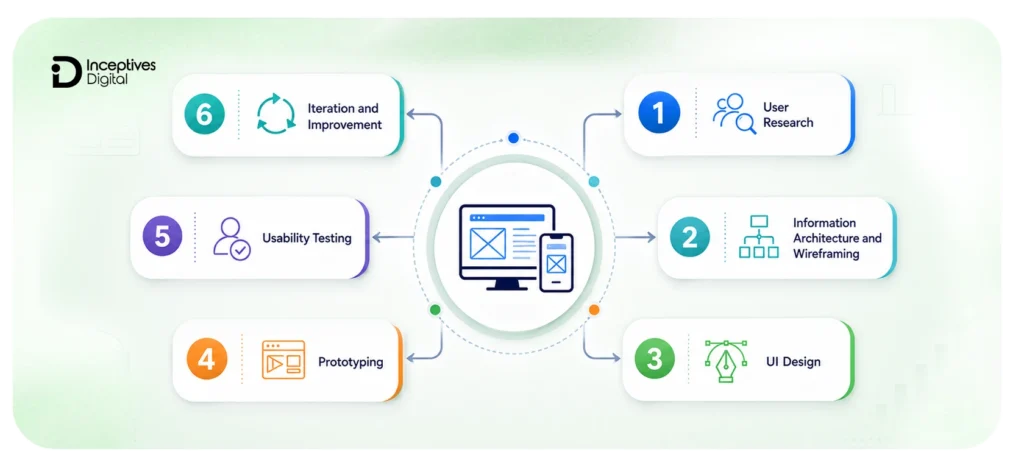
UI/UX design is one of the most crucial steps of the mobile app development process. It follows a structured process that helps ensure the final product is user-friendly, functional, and aligned with business goals. Each stage plays a role in shaping the overall experience of the mobile app.
1. User Research
The UI/UX design process begins with understanding the users. This includes studying their needs, behavior patterns, and pain points. Strong UX design is always based on real user insights, not assumptions.
2. Information Architecture and Wireframing
At this stage, the basic structure of the app is planned. Wireframes define how screens are organized, how users move between them, and where key elements are placed. This step focuses on structure, not visuals.
3. UI Design
Once the structure is clear, the visual design is created. This includes colors, typography, spacing, icons, and overall layout. The goal is to make the interface visually clear, consistent, and easy to understand.
4. Prototyping
Prototypes simulate how the app will function before development begins. This helps teams visualize user flow and identify usability issues early in the process.
5. Usability Testing
Real users interact with the prototype to test how easy it is to use. This stage helps identify friction points, confusing interactions, and areas that need improvement.
6. Iteration and Improvement
Based on feedback, the design is refined and improved. This process may repeat multiple times until the experience feels smooth, intuitive, and aligned with user expectations.
UI/UX Principles That Shape User Behavior in Mobile Apps
UI/UX design is an important factor in mobile app success, rather than just how an app looks or functions. It also influences how users think, react, and make decisions inside the app. Strong products are usually built on a few consistent design principles that reduce confusion and guide users naturally through their journey.
1. Simplicity Over Complexity
Users prefer apps that feel easy to understand from the first interaction. When too many elements compete for attention, decision-making becomes harder, and users start dropping off.
Simplicity in design helps by:
- Reducing cognitive load
- Making actions easier to understand
- Keeping focus on key features
- Improving overall usability
A simple interface often performs better than a visually complex one with unnecessary elements.
2. Speed and Responsiveness
User attention is limited, and delays often break the experience. Even a well-designed app loses impact if interactions feel slow or unresponsive.
Good UX ensures:
- Quick screen transitions
- Minimal waiting time
- Smooth interactions
- Instant feedback after actions
Speed directly affects how users perceive quality and reliability.
3. Clear User Guidance
Users should never feel uncertain about what to do next. A well-designed interface gently guides them through each step without requiring instructions.
This is achieved through:
- Clear call-to-action placement
- Logical flow between screens
- Visual cues and hierarchy
- Predictable navigation patterns
When guidance is missing, users often hesitate or exit the app.
4. Consistency in Design Patterns
Consistency helps users build familiarity with the app. Once they understand how one part of the interface works, they should be able to apply that understanding everywhere else.
This includes:
- Consistent button styles
- Repeated layout patterns
- Uniform typography and spacing
- Predictable interactions
Inconsistent design increases learning effort and slows down user adoption.
5. Trust Through Transparency
Users are more likely to engage with apps they trust. Trust is not only built through content, but also through design clarity and predictable behavior.
Trust is strengthened when:
- Permissions are clearly explained
- Actions feel safe and reversible
- Important information is easy to find
- No hidden or confusing steps exist
This becomes especially important in apps involving payments or personal data.
6. Accessibility for All Users
Good UI/UX design ensures that the app is usable by as many people as possible, regardless of their abilities or limitations.
This includes:
- Readable text and proper contrast
- Large and easy-to-tap elements
- Clear layout structure
- Support for different usage scenarios
Accessibility improves overall usability, not just inclusivity.
Common UI/UX Design Mistakes That Affect Mobile App Success
Even well-built mobile apps fail to perform when UI/UX decisions are not carefully thought through. Most of these issues don’t come from lack of effort, but from overlooking how real users interact with apps in everyday situations.
These UI/UX design mistakes often create friction, slow down user journeys, and directly impact retention and engagement.
1. Overloaded Interfaces
When too many elements are placed on a single screen, users struggle to focus on what actually matters. Instead of guiding attention, the interface competes with itself.
This leads to:
- Confusion during navigation
- Slower decision-making
- Higher drop-off rates
A clean and focused interface always performs better than a cluttered one.
2. Poor Navigation Structure
If users cannot quickly find what they are looking for, they will not spend time trying to figure it out.
Common issues include:
- Hidden menus or unclear labels
- Too many navigation layers
- Inconsistent screen flows
Good navigation should feel predictable, not complicated.
3. Ignoring Platform Guidelines
Users are already familiar with how apps behave on their devices. When an app ignores platform conventions, it creates unnecessary friction.
This often results in:
- Confusion in gestures and controls
- Inconsistent user expectations
- Reduced comfort during usage
Following platform standards improves familiarity and ease of use.
4. Weak Onboarding Experience
First impressions matter heavily in mobile apps. If onboarding feels long, unclear, or overwhelming, users often leave before experiencing the core value.
Typical onboarding problems include:
- Too many steps upfront
- Unclear value proposition
- Unnecessary instructions
A strong onboarding flow should guide users quickly, not delay them.
5. Slow or Unresponsive Performance
Performance is a core part of UX. Even if the design is visually strong, delays in loading or interaction reduce user trust.
This can lead to:
- Frustration during usage
- Lower engagement
- Reduced retention
Users expect apps to respond instantly.
6. Lack of User Testing
Designing without testing real user behavior often leads to assumptions that don’t match reality.
Without testing, apps may suffer from:
- Unclear interaction patterns
- Hidden usability issues
- Missed friction points
Regular usability testing helps identify problems early.
7. Treating UI/UX as a One-Time Task
User expectations evolve over time. Apps that are not updated regularly start to feel outdated and less intuitive.
This results in:
- Declining engagement
- Reduced retention
- Loss of competitive edge
UI/UX should be treated as an ongoing improvement process, not a one-time design phase.
How to Measure the Impact of UI/UX Design on Mobile Apps
The real value of UI/UX design shows up in how users behave after interacting with the product. To understand whether the design is working, it needs to be evaluated through measurable user and business data.
1. User Retention Rate
Retention shows how many users return to the app after their first interaction. It is one of the strongest indicators of UI/UX effectiveness.
If users come back regularly, it usually means:
- The app is easy to use
- The experience feels consistent
- Users find value without friction
Low retention often signals confusion, poor onboarding, or weak usability.
2. User Engagement Metrics
Engagement measures how actively users interact with the app during a session.
Key signals include:
- Session duration
- Number of screens visited
- Actions taken per session
Higher engagement usually reflects a smooth and intuitive user experience that encourages exploration instead of hesitation.
3. Conversion Rates
Conversion metrics track how effectively users complete important actions, such as:
- Signing up
- Making a purchase
- Completing a form
- Subscribing to a service
Even small UX issues like unclear buttons or unnecessary steps can reduce conversions significantly.
4. Drop-Off Points in User Flow
Understanding where users leave the app helps identify friction in the experience.
Common drop-off points include:
- Onboarding screens
- Checkout or payment steps
- Complex navigation paths
If users consistently abandon the same step, it often indicates a UX problem that needs simplification.
5. App Store Ratings and Reviews
After publishing your app, user feedback on the app stores reflects real-world experience. While subjective, it is still a strong indicator of satisfaction.
Positive ratings often correlate with:
- Smooth usability
- Intuitive design
- Reliable performance
Negative reviews usually highlight frustration with navigation, speed, or overall usability.
6. Behavioral Analytics Tools
Tools like heatmaps and session recordings help visualize how users interact with the app in real time.
They reveal:
- Where users tap most often
- Where they get confused or stuck
- Which elements are ignored
These insights help teams improve UI/UX design decisions based on real behavior instead of assumptions.
UI/UX Checklist Before Launching a Mobile App
Before publishing your app on the app stores, UI/UX needs to be checked from a user’s perspective, not just from a design or development standpoint. Small usability gaps at this stage can later turn into retention or conversion problems.
This checklist helps ensure the experience feels smooth, intuitive, and ready for real users.
1. Clear and Simple Navigation
Users should be able to move through the app without thinking too much about where to go next. If navigation feels confusing during testing, it will only become worse after launch.
Check if:
- Menus are easy to locate
- Key actions are accessible within a few taps
- Screen flow feels logical
2. Consistent Design Across Screens
Inconsistent design creates confusion and breaks user trust. Every screen should follow the same visual logic.
Make sure:
- Buttons look and behave the same everywhere
- Spacing and typography are consistent
- Color usage follows a defined pattern
3. Smooth Onboarding Experience
Onboarding should help users understand value quickly, not overwhelm them with too much information.
Verify that:
- Onboarding is short and focused
- Users can skip unnecessary steps
- The value of the app is clear early
4. Mobile Responsiveness and Touch Comfort
A mobile app must feel natural on different screen sizes and usage styles.
Ensure:
- Buttons are easy to tap
- Layouts adjust properly on different devices
- No element feels too small or cramped
5. Fast Loading and Smooth Interactions
Performance directly affects user perception of quality.
Check for:
- Quick screen transitions
- Minimal loading delays
- Smooth animations and feedback
6. Accessibility Readiness
An app should be usable by a wide range of users, including those with different abilities.
Confirm:
- Text is readable across devices
- Contrast is sufficient
- Interactions are simple and clear
7. Error Handling and User Feedback
Users should always understand what is happening inside the app.
Make sure:
- Error messages are clear and helpful
- Loading states are visible
- Success actions are confirmed
8. Real User Testing Before Launch
Internal testing is not enough. Real user feedback often reveals issues that teams miss.
Include:
- Usability testing sessions
- Feedback collection
- Behavior observation during tasks
Key Takeaways on the Importance of UI/UX in Mobile Apps
UI and UX design play a central role in determining how users perceive and interact with a mobile app. From first impressions to long-term engagement, every visual choice and interaction flow influences whether users stay, return, or leave. A well-designed experience improves usability, strengthens trust, and directly supports key business outcomes like retention, conversions, and app store performance. In simple terms, UI/UX is not just a design layer; it is a core part of how successful mobile apps are built and sustained.
If you are planning to build or improve an app, focusing on UI/UX from the start can make a noticeable difference in how users respond to it in real-world usage. Many businesses also choose professional mobile app development services to ensure that both design and functionality work together to create a smooth, user-friendly experience. A thoughtful approach to UI/UX can turn an ordinary app into one that feels intuitive, reliable, and worth keeping on the device.
CTA SECTION START
cta title: Ready to Unlock 5 Key Benefits of Better UI/UX Design in Your Mobile App?
cta des: Work with mobile app development services to create smooth, engaging apps that improve retention and user satisfaction.
cta button: Talk to an Expert
CTA SECTION END
FAQs
1. What is UI/UX design in mobile apps?
UI/UX design in mobile apps refers to the process of creating both the visual appearance (UI) and the overall user experience (UX) of an application. UI focuses on how the app looks, while UX focuses on how easy and smooth it is to use.
2. Why is UI/UX important in mobile app development?
UI/UX is important because it directly affects how users interact with an app. A well-designed experience improves usability, increases engagement, boosts retention, and helps users complete actions without confusion or frustration.
3. How does UI/UX affect mobile app success?
UI/UX impacts mobile app success by shaping user behavior. If the experience is smooth and intuitive, users are more likely to stay longer, return frequently, and recommend the app to others. Poor UX often leads to high uninstall rates.
4. How does UI/UX design affect app development cost?
UI/UX design directly impacts app development cost because factors like custom interfaces, user research, and usability testing require additional time and planning. However, investing in good UI/UX early can reduce costly revisions and improve long-term app performance.
5. Can UI/UX improve app retention?
Yes, UI/UX plays a major role in retention. When users find an app easy to understand and use, they are more likely to return. A confusing or frustrating experience usually results in early drop-offs.
6. What is the difference between UI and UX?
UI refers to the visual elements of an app, such as colors, buttons, and layout. UX refers to the overall experience, including how users navigate the app, complete tasks, and interact with features.
7. How is UI/UX designed in mobile apps?
UI/UX design follows a structured process that includes user research, wireframing, UI design, prototyping, usability testing, and continuous improvement based on user feedback.
SIDEBAR LIST START
- The Importance of UI/UX Design in Mobile App Development
- Understanding UI and UX in Mobile Apps
- How UI/UX Design Impacts Mobile App Performance?
- Real-World Examples of Effective UI/UX Design in Mobile Apps
- Key Elements of Effective Mobile App UI/UX Design
- UI/UX Design Process in Mobile App Development
- UI/UX Principles That Shape User Behavior in Mobile Apps
- Common UI/UX Design Mistakes That Affect Mobile App Success
- How to Measure the Impact of UI/UX Design on Mobile Apps
- UI/UX Checklist Before Launching a Mobile App
- Key Takeaways on the Importance of UI/UX in Mobile Apps
- FAQs
SIDEBAR LIST END