More than 4.60 million apps are competing for visibility across the App Store and Google Play Store. Yet only a small percentage of them consistently attract downloads and dominate search results. The difference is rarely the app idea itself. In most cases, it comes down to how effectively the app is optimized for discovery.
No matter how innovative your application is, users will struggle to find it without a strong app store optimization (ASO) strategy. As competition in mobile app development continues to grow, simply publishing an app is no longer enough. To increase visibility, drive organic installs, and improve conversion rates, businesses need a data-driven ASO approach that aligns with how app store algorithms rank and recommend apps.
From keyword optimization and creative assets to ratings, localization, and retention signals, every element of your app listing impacts performance. When implemented correctly, ASO strategies can significantly improve app rankings while reducing dependency on paid user acquisition campaigns. This is why many businesses now work with a professional mobile app development company that understands both app development and app growth optimization.
In this blog, we’ll break down proven ASO strategies that help improve app store rankings, increase downloads, and strengthen long-term app visibility across both Google Play and the Apple App Store.
What Is App Store Optimization (ASO)?
App Store Optimization (ASO) is the process of improving an app’s visibility, rankings, and conversion rate within app marketplaces like the Apple App Store and Google Play Store. The goal of ASO is to help more users discover your app organically and encourage them to install it.
ASO works by optimizing different elements of your app listing, including keywords, app title, description, screenshots, app icon, ratings, reviews, and overall user experience. A well-optimized app not only ranks higher in search results but also attracts more relevant users who are likely to engage and stay active.
Today, ASO has become one of the most effective organic growth strategies for businesses looking to reduce user acquisition costs and increase long-term app visibility. Even the most innovative apps can struggle to gain traction without proper optimization.
Key Factors That Influence App Store Rankings
Both Google Play Store and Apple App Store use algorithms to evaluate app quality and relevance. Some of the biggest ranking factors include:
| Ranking Factor | Why It Matters |
| Keywords | Help app stores understand your app’s relevance to user searches |
| Conversion Rate | Higher install rates improve app visibility and rankings |
| Ratings & Reviews | Positive feedback increases trust and ranking signals |
| User Retention | Apps with strong engagement tend to rank better |
| Update Frequency | Regular updates signal active maintenance and reliability |
| Uninstall Rate | High uninstall rates can negatively affect rankings |
Most ASO strategies are designed to improve one or more of these ranking signals.
ASO vs SEO: What’s the Difference?
ASO and SEO share similar goals, improving visibility and attracting organic traffic, but they work on different platforms.
SEO focuses on improving website rankings on search engines like Google, while ASO focuses on increasing app visibility within app stores. In ASO, success is measured through app installs, retention, and conversion rates rather than website clicks alone.
Both require continuous optimization, keyword targeting, and performance analysis to achieve long-term growth.
How App Store Algorithms Rank Apps?
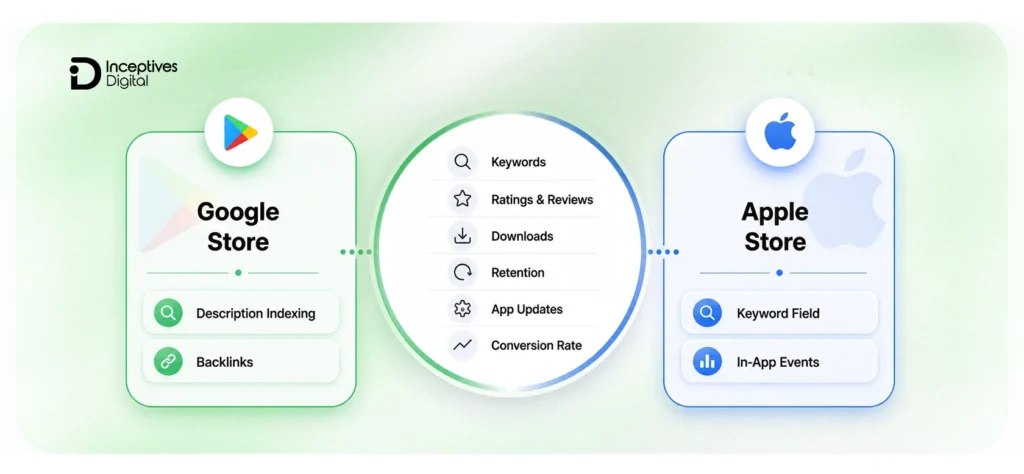
Understanding how app store algorithms work is essential before implementing any ASO strategy. Both the Apple App Store and Google Play Store use ranking systems that analyze multiple signals to determine which apps should appear higher in search results and category rankings.
The stronger your app performs across these ranking signals, the better your chances of increasing visibility, attracting organic installs, and improving overall app store rankings.
Core Ranking Factors Used by App Stores
| Ranking Factor | Impact on ASO |
| Keyword Relevance | Helps app stores match your app with user search queries |
| App Title & Metadata | Strong keyword placement improves discoverability |
| Conversion Rate (CVR) | Higher install rates signal app relevance and quality |
| Ratings & Reviews | Positive reviews improve trust and ranking potential |
| User Retention | Apps with better engagement often rank higher |
| Update Frequency | Regular updates show active development and maintenance |
| App Performance | Faster, stable apps reduce uninstall rates and improve user satisfaction |
| Backlinks & Brand Mentions | External authority can indirectly improve visibility |
Google Play vs Apple App Store Ranking Signals
Although both stores focus on app quality and user experience, their ranking systems work differently.
| Factor | Apple App Store | Google Play Store |
| Keyword Indexing | Title, subtitle, keyword field | Title, short & long description |
| A/B Testing | Limited native support | Built-in store listing experiments |
| Review Impact | Important | Highly influential |
| Update Impact | Moderate | Strong ranking influence |
| Metadata Flexibility | More restricted | More keyword flexibility |
Why These Ranking Signals Matter
Most successful ASO strategies are designed to improve these signals over time. For example:
- Better keywords improve discoverability
- Stronger screenshots increase conversion rates
- Regular updates improve retention and app quality signals
- Positive reviews strengthen trust and rankings
This is why ASO should never be treated as a one-time setup. App store algorithms continuously evolve, and ongoing optimization is necessary to maintain visibility and organic growth.
Proven App Store Optimization Strategies
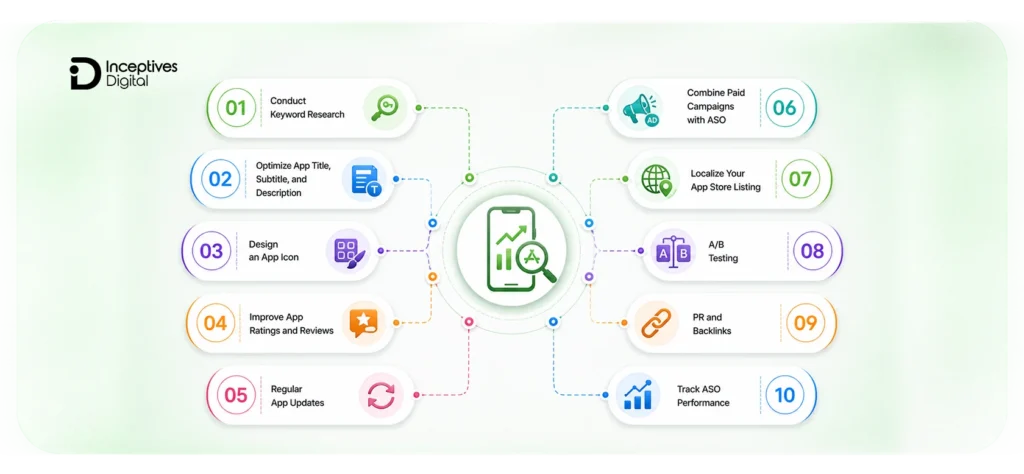
The ASO strategies below are designed specifically to improve those ranking signals in a practical and measurable way, helping your app gain consistent visibility and long-term growth.
1. Conduct Keyword Research to Improve App Store Visibility
The foundation of every good ASO strategy is built on solid keyword research. Similar to SEO, it dictates the ease of the app discoverability when searching the App Store or Google Play Store. The correct keywords lead not only to a higher ranking of your app but also to the generation of incoming traffic that is relevant to your app and the accumulation of organic installs.
Why Keyword Research Matters in ASO?
More than 65% of app downloads come directly from app store searches. This means your app’s discoverability largely depends on how well your keywords align with user search behavior.
Effective keyword research helps you:
- Improve app visibility in search results
- Attract users with higher install intent
- Increase organic downloads
- Reduce dependency on paid acquisition campaigns
- Improve overall conversion rates
Types of Keywords to Target
A balanced ASO strategy should include a mix of keyword types.
| Keyword Type | Example | Purpose |
| Core Keywords | budget tracker | Main app functionality |
| Feature Keywords | expense management app | Specific app capabilities |
| Long-Tail Keywords | budget tracker for students | Lower competition, higher intent |
| Competitor Keywords | similar branded terms | Capture competitor traffic |
| Localized Keywords | finance app in Spanish | Improve global visibility |
How to Find High-Value ASO Keywords
To identify the best keywords for your app:
- Analyze competitor app listings
- Target medium-volume, lower-competition terms
- Prioritize keywords with strong install intent
- Monitor ranking difficulty regularly
- refresh keywords based on performance trends
For the Google Play Store, keywords placed naturally in the title, short description, and long description can influence rankings. In the Apple App Store, keyword optimization relies heavily on the title, subtitle, and keyword field.
Best ASO Keyword Research Tools
| Tool | Key Feature | Ideal For |
| AppTweak | Keyword suggestions, competition analysis | In-depth planning |
| MobileAction | Real-time tracking, competitor insights | Continuous monitoring |
| AppFollow | Keyword trends + review mining | User sentiment analysis |
| App Radar | Localization + ranking insights | Multi-language apps |
| Sensor Tower | Market intelligence & traffic scores | Competitive benchmarking |
Pro Tips for Better Keyword Optimization
- Place your primary keyword near the beginning of the app title
- Avoid keyword stuffing in descriptions
- Focus on keywords with strong user intent, not just high search volume
- Track keyword rankings weekly
- Refresh metadata every 4–6 weeks based on performance data
- Use localized keywords to improve visibility in international markets
Strong keyword research creates the foundation for every other ASO strategy, making it one of the most important factors in improving app store rankings consistently.
2. Optimize App Title, Subtitle, and Description for Higher Rankings
Your app title and metadata play a major role in both app discoverability and conversion rates. They help app store algorithms understand what your app does while also convincing users to install it.
A well-optimized app listing can significantly improve keyword rankings, increase click-through rates, and drive more organic downloads without increasing ad spend.
Key Metadata Elements to Optimize
| Element | Why It Matters |
| App Title | Strongest keyword ranking signal |
| Subtitle / Short Description | Improves discoverability and communicates value quickly |
| Long Description | Helps Google Play understand app relevance |
| Keyword Field (iOS) | Supports additional keyword targeting |
| Feature Highlights | Improve readability and conversions |
Apple App Store vs Google Play Optimization
| Metadata Area | Apple App Store | Google Play Store |
| Title Limit | 30 characters | 30 characters |
| Subtitle / Short Description | 30 characters | 80 characters |
| Long Description | Limited indexing impact | Indexed for keywords |
| Keyword Field | Available | Not available |
Best Practices for ASO Metadata Optimization
- Place your primary keyword near the beginning of the title
- Keep titles short, clear, and readable
- Avoid keyword stuffing or unnatural phrasing
- Focus descriptions on user benefits, not just features
- Use bullet points for better readability
- Include relevant secondary keywords naturally
- Refresh metadata regularly based on keyword performance
Writing Descriptions That Improve Conversions
Strong ASO descriptions should:
- explain the app’s core value immediately
- highlight unique features and benefits
- build trust through social proof or achievements
- encourage users to take action
Instead of generic messaging, focus on solving user problems clearly.
3. Design an App Icon That Increases Click-Through Rate
Your app icon is often the very first thing users notice in search results. Before they read your app title, screenshots, or reviews, they usually judge your app visually within seconds. A strong icon can improve click-through rates (CTR), increase installs, and positively influence app store rankings.
Even small icon improvements can create a major impact on conversions. According to SplitMetrics, optimized app icons can increase install rates by up to 25%.
Why App Icons Matter in ASO?
App stores track how users interact with your listing. If more users tap your app after seeing it in search results, your visibility and rankings can improve over time.
A well-designed app icon helps:
- attract attention in crowded search results
- improve click-through rates
- increase install conversions
- strengthen brand recognition
- build user trust instantly
Key Elements of a High-Converting App Icon
| Element | Best Practice |
| Simplicity | Keep the design clean and recognizable |
| Contrast | Use colors that stand out against app store backgrounds |
| Scalability | Ensure the icon looks clear at smaller sizes |
| Brand Identity | Reflect your app’s purpose and personality |
| Consistency | Match the overall style of your app and screenshots |
Common App Icon Mistakes to Avoid
- Adding too much text
- Using overly detailed graphics
- Copying competitor designs too closely
- Using low-contrast color schemes
- Changing branding too frequently
Color Psychology in App Icons
Colors influence user perception and behavior. Choosing the right palette can improve engagement and brand recall.
| Color | Common Association | Best For |
| Blue | Trust and reliability | Finance, productivity |
| Green | Growth and wellness | Health, lifestyle |
| Red | Energy and excitement | Gaming, entertainment |
| Yellow | Creativity and optimism | Education, kids’ apps |
Test Different Icon Variations
A/B testing helps identify which icon design drives the highest conversion rates. You can test:
- color variations
- icon shapes
- background styles
- minimal vs detailed designs
- branding elements
Tools like SplitMetrics, StoreMaven, and Google Play Experiments can help measure which version performs best.
4. Improve App Ratings and Reviews to Build User Trust
Have you ever seen an application with numerous positive ratings and decided to download it because you were more sure? Well, you are part of a big group. Over 90% of people review the comments before they download the application. Applications with a better average rating (4.5★ and above) can experience up to three times higher number of sales. User ratings and reviews are not only a factor that influences consumers significantly, but they also affect the App Store and Google Play rankings of applications.
Why Ratings and Reviews Matter for ASO?
Positive feedback helps app stores understand that users find value in your application. Consistent ratings and reviews can:
- improve app visibility in search results
- increase install conversion rates
- build trust with new users
- strengthen user retention signals
- reduce uninstall rates
Applications with ratings above 4.5 stars often perform significantly better than lower-rated competitors in both downloads and conversions.
Best Practices to Increase Positive Reviews
| Strategy | Why It Works |
| Ask at the Right Moment | Users are more likely to leave reviews after positive experiences |
| Use In-App Review Prompts | Makes the review process faster and more convenient |
| Respond to User Feedback | Builds trust and improves user satisfaction |
| Fix Common Complaints Quickly | Reduces negative reviews and uninstall rates |
| Encourage Honest Feedback | Improves authenticity and review quality |
When Should You Ask for Reviews?
Timing plays a major role in review conversion rates. The best moments include:
- after completing a successful action
- after achieving progress or milestones
- after positive user engagement
- after resolving an issue successfully
Avoid asking for reviews immediately after app installation or during frustrating user experiences.
Tools for Review Monitoring and Management
| Tool | Best Use Case |
| AppFollow | Review monitoring and sentiment analysis |
| Appbot | User feedback tracking |
| Sensor Tower | ASO insights and review monitoring |
| MobileAction | App performance tracking |
Why Review Velocity Matters
App stores not only evaluate review quality but also review frequency. Apps that consistently receive fresh reviews often appear more active and trustworthy than apps with outdated feedback.
Encouraging ongoing reviews helps maintain:
- stronger engagement signals
- better ranking consistency
- higher user trust
- improved conversion rates
5. Regular App Updates to Boost Rankings and Retention
Maintaining an app without any improvements means eventually getting left behind. The regular updates have the support of both the App Store and Google Play, as they consider the updated apps to be of good quality, secure, and actively developed. The same goes for users who are aware of it. Consistently updating apps results in retaining 30% more users and getting better rankings overall.
Why Updates Matter for ASO?
The algorithms used by the store monitor different quality indicators that affect the visibility of the products:
| Metric | Why It Matters |
| Update Frequency | Shows ongoing support and app maintenance. |
| Crash Rate & Performance | Fewer errors mean higher ratings and better rankings. |
| User Retention | The more users stay, the stronger your ASO performance. |
Every update brings along a new chance to renew your keywords, enhance the user experience, and get existing users back.
What to Focus on When Updating?
- Fix bugs and optimize speed – Uninstallations and negative ratings are often consequences of poor performance or regular crashes.
- Improve UI/UX – A more intuitive design or an easier-to-use interface can instantly increase engagement.
- Enhance features based on feedback –Make significant improvements by considering reviewer insights.
- Refresh ASO elements – Change your images, text, and area keywords every few months to keep them fresh.
Pro Tip
Use Firebase Crashlytics, Instabug, or TestFlight for real-time bug tracking and performance monitoring. Combine these with AppTweak or AppFollow to measure how each update affects rankings and conversion rates.
6. Combine Paid Campaigns with ASO for Faster Growth
Relying solely on organic downloads is synonymous with shouting in a crowded room. No matter how excellent your app is, it might never get enough exposure. The cleverest app development companies combine paid ads with ASO in order to increase visibility, installs, and training of the algorithm faster.
Why Does Combination Work?
Engagement metrics, installs, retention, and uninstall rates are used by app stores to decide the rank of the app. Paid campaigns create short-term traffic and install spikes which improve your app’s visibility and credibility, thus resulting in stronger organic growth over time. From utility tools to mobile game development, combining organic discovery with targeted ads is key to scaling downloads efficiently.
| Type of Growth | Key Benefit | Limitation |
| Organic | Sustainable, cost-effective, and builds trust | Slower to scale, dependent on ASO strength |
| Paid | Immediate visibility, faster keyword ranking | Needs a budget, short-term impact if unmanaged |
They both work together; paying for traffic fuels the algorithm, while ASO converts it into lasting users.
Best Channels for Paid Growth
- Apple Search Ads – It is a perfect option for iOS applications and also assists in locating users with high intent who are searching for keywords that are relevant.
- Google App Campaigns – It operates on Search, YouTube, and the Play Store simultaneously in order to have a very big reach.
- Meta Ads (Facebook & Instagram) – It is excellent for campaigns that are visually engaging and for targeting custom audiences.
- TikTok Ads – It is a powerful advertising tool for lifestyle and entertainment apps that are targeting the Gen Z audience.
Pro Tip: Get some small cost-per-install (CPI) campaigns to see which channels get users who actually stay and engage.
Measure and Balance Performance
Keep an eye on these metrics to get your ideal ratio of paid to organic:
| Metric | What It Tells You |
| Organic Uplift (%) | How much do your organic installs increase after paid ads? |
| Cost per Retained User (CRU) | The real cost of acquiring users who stay active. |
| Conversion Rate (CVR) | How effectively your ASO turns ad traffic into installs. |
You can use tools like Adjust, Appsflyer, and Singular for accurate installation attribution and ROI measurement.
7. Localize Your App Store Listing for Global Downloads
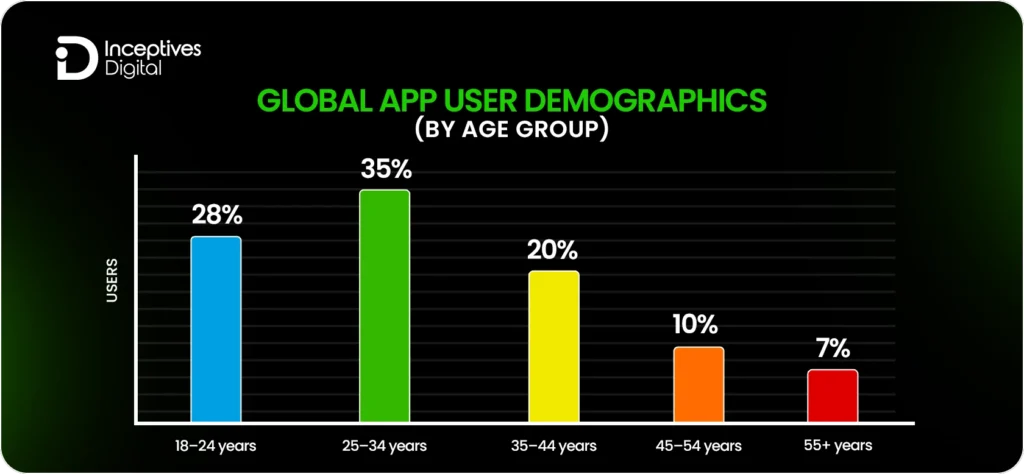
Being solely optimized for English speakers means that the app is missing out on a huge audience. According to studies, almost 72% of people use apps in their mother tongue, and foreign apps get 30-40% more downloads on average. Localization cannot be equated with just translation. It requires changing the app and its store listing completely according to the different cultures, habits, and markets.
Why Localization Boosts ASO?
App Store and Google Play treat every localized version of the application as a separate listing. In other words, with every new language, there will be more chances of being ranked for different keywords and attracting the regional audience.
| Localization Element | Purpose | Example |
| Title & Subtitle | Improves keyword targeting per region | “Budget Planner” → “Planificateur de Budget” (French) |
| Description | Builds trust and engagement | Use local idioms and relevant examples |
| Screenshots & Videos | Align visuals with cultural context | Currency, dates, and images familiar to the audience |
| Keywords | Targets region-specific search behavior | “Taxi app” vs. “Cab booking app” |
How to Implement Localization
- Focus on high-traffic areas first – Translate the top markets from your reports (e.g., Spanish, French, Arabic, German).
- Make metadata and visuals local – It’s not enough to translate. You must configure text and pictures to be pertinent in the local context.
- Experiment with regional keywords – Find search terms in every language using tools like AppTweak, App Radar, or Sensor Tower.
- Customer support and push notifications localization – Keep the user experience consistent outside of the app listing.
Pro Tip:
Localization can also bring a significant increase to your conversion rate to install (CVR). Apps that localize not only the store metadata but also the in-app content frequently report up to a 200% rise in particular areas.
8. Use A/B Testing to Improve Conversion Rates
It’s impossible to enhance a product if its performance isn’t evaluated first. A/B testing (that is somewhat synonymous with split testing) facilitates a clear view of the reasons behind the number of downloads, be it your icon, screenshots, title, or description. A/B testing via Google Play Experiments is a great way to discover what actually causes conversions in Android app development. On the other hand, in iOS app development testing, different creatives or metadata through tools like SplitMetrics or StoreMaven may show how users interact with the app before it is downloaded. Apps with the most downloads do not rely on their intuition but on a cycle of testing, analyzing, and refining their products.
Why A/B Testing is Important?
User behavior is quite dynamic. Something effective six months ago may not be effective today. Conducting small experiments in a controlled way gives you the opportunity to:
- Recognize the things that appeal to users and boost the conversion rate to install (CVR).
- Decrease the cost of acquisition via boosting the store’s performance before scaling up the ads.
- Be in sync with the trends and the competitors’ visuals or messaging strategies.
The applications that do regular tests claim 20–30% greater conversion rates and less fluctuating rankings.
What to Test?
| Element | What to Test | Key Metric |
| App Icon | Colors, shapes, or design style | Tap-through rate (CTR) |
| Screenshots | Layout, captions, or order | Conversion to install |
| Title & Subtitle | Keyword placement, emotional appeal | Search visibility + CVR |
| Video Preview | Length, thumbnail, call-to-action | Engagement rate |
| Description | Tone, format (paragraph vs. bullet) | Average time on listing |
Best Tools for A/B Testing
- Google Play Experiments: Integrated right into Play Console, at no cost, simple to use.
- SplitMetrics and Storemaven: For apps on iOS and thorough user behavior monitoring.
- Apptimize or Optimizely: For A/B testing in-app after installation (UI, UX, features).
Pro Tip: Test one single factor at a time. Altering too many factors together makes it difficult to identify the one that is actually contributing to performance improvement.
How to Analyze Results?
- Statistically valid results should be obtained by running each test for no less than 7-10 days or waiting until then.
- Retention rate, reviews, and in-app engagement after downloading should all be taken into account, along with the number of installations.
- Iterative testing should be continued. Each enhancement has a cumulative effect over a period of time.
9. Build External Authority Through PR and Backlinks
App Store algorithms don’t rank your app by itself. They evaluate how trusted and visible your app is on the internet. Mentions, backlinks, PR coverage, and social proof add to your app’s reputation, which in turn results in higher click-through rates, more installs, and better rankings.
Apps that are highly visible externally often get up to 40% more organic installs, just because users have acknowledged and trusted them prior to visiting the store.
How to Build External Authority
| Tactic | Why It Works | Example |
| PR & Media Coverage | Increases trust and brand visibility; supports the drawing of early adopters and investors. | In case of new product releases or updates, get featured on sites similar to TechCrunch or Product Hunt. |
| Backlinks from Relevant Sites | Expose your app to competitive searches by sending authority signals to Google Play. | Publish guest posts or case studies that point directly to your application page. |
| Influencer & Creator Collaborations | Through practical examples, the authenticity and peer credibility are enhanced. | Collaborate with specific influencers to exhibit the primary advantages of your application. |
| Social Proof | The user trust is strengthened, and the conversions are increased at the same time. | Present critiques, conquering of download thresholds, or honors in your online shop and brand website. |
Tools to Track Progress
Utilize the available tools, such as Ahrefs, SEMrush, or AppFollow, to keep an eye on your backlinks, keyword movements, and referral traffic as a result of PR or influencer activities. By observing these signals, you will be able to discern the external sources that really help in getting higher rankings and, thus, more downloads.
Pro Tip: Don’t go for fake reviews or spammy backlinks, as both App Store and Play Store algorithms are smart enough to identify deceitful signals and thus lower rankings as a penalty. It’s better to work with fewer yet superior quality resources than with many of inferior quality.
10. Track ASO Performance Using Data and Analytics
The mobile app development sector continues to change, and so should your app’s ASO strategy. The performance that was great last month might not be the same this month, as competition, algorithms, and users’ preferences are constantly changing. The foundation of outpacing others is continuous monitoring and optimization driven by real data, not mere assumptions.
Focus on Actionable Data
Monitoring of performance metrics is of no use unless you make use of them. Don’t just rely on the number of downloads, but also the level of engagement of the users with your app and the app’s presentation.
| Metric | Why It Matters |
| Click-Through Rate (CTR) | Measures how effective your icon and title are in attracting attention. |
| Install-to-Open Rate | Reveals how many users actually engage after installation. |
| Lifetime Value (LTV) | Helps you evaluate the real ROI of your ASO campaigns. |
| Keyword Movement | Identifies which terms drive consistent organic traffic. |
Tools That Give You Clarity
Employ data analysis tools that link both retail and application data together.
- SplitMetrics – Measures the effect of A/B testing on conversion rates.
- App Annie (data.ai) – Provides comprehensive analysis of market data and keyword trends.
- Firebase Analytics – Gives insights into user behavior and retention.
How to Refine Your ASO Strategy?
- Early spotting of performance decreases – Sudden ranking shifts or engagement dips should be monitored with alerts set up.
- Updates associated with results – The performance of the application is compared before and after updates.
- Change the frequency – Optimize your schedule according to the speed of changes in your category.
- Competing with the rivals – Their keyword trends, ratings, and release frequency should be analyzed.
How Much Does App Store Optimization (ASO) Cost?
The cost of App Store Optimization (ASO) could differ a lot depending on the size, rivalry, and objectives of your app. Small developers may do basic ASO by themselves to reduce the overall mobile app development cost, while big brands usually spend on expert services and tools for profound analysis and continuous optimization.
Average ASO Cost Breakdown
| Type of ASO Service | Estimated ASO Cost Range | What It Includes |
| Basic ASO Setup | $300–$700 (one-time) | Keyword research, metadata optimization, and store listing setup. |
| Full ASO Service | $1,000–$5,000/month | Continuous keyword tracking, A/B testing, competitor analysis, and reporting. |
| ASO Tools & Software | $50–$500/month | Keyword ranking, visibility, and conversion tracking via platforms like AppTweak or MobileAction. |
| Localization & Translation | $20–$50 per language | Adapting titles, descriptions, and visuals for new regions. |
Factors That Affect ASO Cost
- The App Category – Competitive niches such as gaming or finance generally ask for higher resource allocation.
- Number of Markets – Reaching out to several countries implies extra localization and keyword tracking.
- Frequency of Updates – Constantly updating apps requires continuous ASO adjustments.
- Depth of Data Analysis – Heavy tracking, testing, and reporting contribute to the costs.
Is App Store Optimization Worth the Investment?
Definitely. If an app is optimized properly, it can get up to +450% more organic installations and have drastically lower ASO costs for obtaining new users. The return on investment of a modest ASO budget, which is mainly in the form of visibility, higher conversions, and continuous growth, is worth it in the long run.
Boost Your App Store Rankings with a Strong ASO Strategy
App Store Optimization is a continuous process that directly influences how easily users can discover and install your app. The 10 strategies covered in this blog show that improving rankings is not about one single change but a combination of factors like keyword targeting, visuals, user trust, performance updates, and external authority. When applied consistently, these practices help improve visibility, boost conversions, and support long-term organic growth for your app after publishing on App Store and Google Play.
If you are planning to scale your app or improve its current performance, combining strong ASO with well-built product execution can make a noticeable difference. Many businesses also align their optimization efforts with professional mobile application development services to ensure their app is not only visible in search results but also delivers a smooth and engaging user experience that keeps users coming back.
CTA SECTION START
cta title: Achieve 10X App Growth with Our Proven ASO Strategies
cta des: Apply practical ASO strategies to improve visibility, strengthen rankings, and steadily grow organic installs across App Store and Google Play
cta button: Get Started with ASO Growth
CTA SECTION END
FAQs Regarding App Store Optimization
In general, it takes 2 to 4 weeks for the first signs of ASO improvements to appear. Nevertheless, continuous growth is going to be the result of constant monitoring, updating, and performing keyword optimization.
The price range for ASO services varies from DIY tools at $50/month to professional services at $5,000/month. Ultimately, it will depend on your goals, the complexity of your app, and your competition.
The best ASO tools are App Radar, Mobile Action, AppTweak, AppFollow, and Sensor Tower. All of them provide valuable information on keywords, competitors, and conversion metrics.
Not to a total extent. ASO brings about organic growth that is sustainable over time, while paid ads can only give you visibility in the short run. The combination of both strategies yields the highest results.
Once a month at a minimum. App stores update their algorithms quite frequently, and user trends are changing rapidly. Continuous testing is the only way to ensure you are competitive.
SIDEBAR LIST START
- Proven ASO Strategies to Boost App Store Rankings
- What Is App Store Optimization (ASO)?
- How App Store Algorithms Rank Apps?
- Proven App Store Optimization Strategies
- How Much Does App Store Optimization (ASO) Cost?
- Boost Your App Store Rankings with a Strong ASO Strategy
- FAQs Regarding App Store Optimization
SIDEBAR LIST END