Apple’s App Store listed 2.42 million apps in 2026, and Google Play had 1.58 million apps live alongside it. With those listings fighting for the same searches, a weak ASO strategy doesn’t just cost you rankings, it gets your app buried.
This is precisely where common ASO mistakes do the most damage.
We have mentioned common ASO mistakes in this post that regularly limit an app’s visibility on Google Play and the Apple App Store, along with a solution for each.
If you’re new to App Store Optimization, start with this complete App Store Optimization guide before tackling the common mistakes.
By the end of this post, you’ll know how to:
- Identify the ASO mistakes limiting your app’s visibility.
- Determine whether you’re facing a ranking issue, a conversion issue, or both.
- Prioritize the fixes that will improve visibility and drive more organic installs.
Let’s dig into the blog faster.
Quick Summary
The most common ASO mistakes include weak keyword research, poorly optimized metadata, keyword stuffing, platform-blind optimization, weak visual assets, and a lack of localization or ongoing monitoring. These mistakes can limit app visibility, rankings, and organic installs. This guide explains how to identify and fix each issue, prioritize improvements, and audit your app listing for better ASO performance.
Top 10 ASO Mistakes That Kill App Visibility and How to Fix
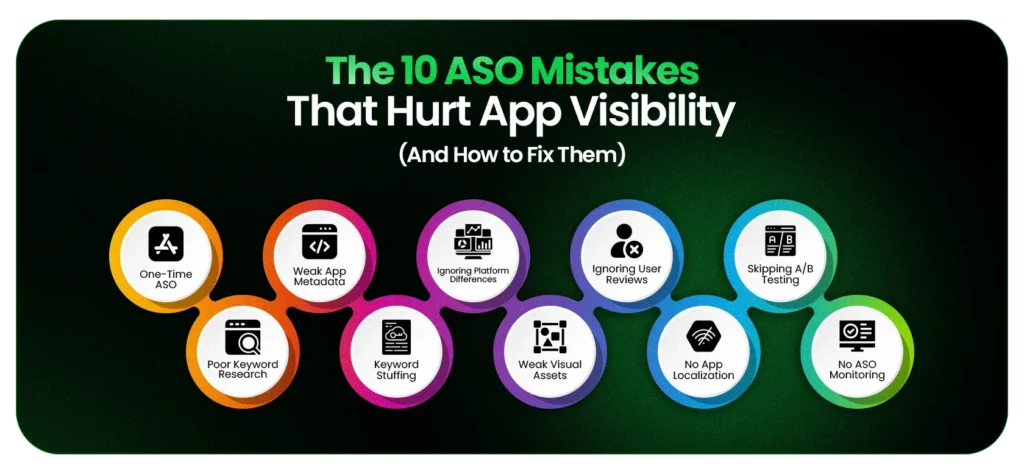
Learn the most common ASO mistakes that reduce app visibility and the practical steps to improve your App Store rankings and organic installs.
| # | ASO Mistake | Brief Description / Fix |
| 1 | One-Time ASO | Treat ASO as an ongoing process and optimize after major updates. |
| 2 | Skipping Keyword Research | Target keywords users actually search for instead of making assumptions. |
| 3 | Weak App Metadata | Optimize titles, descriptions, and metadata with relevant keywords. |
| 4 | Keyword Stuffing | Write naturally and avoid repeating the same keywords. |
| 5 | Same Strategy for iOS & Android | Optimize separately for the Apple App Store and Google Play Store. |
| 6 | Weak Visual Assets | Improve screenshots, icons, and preview videos to increase conversions. |
| 7 | Ignoring Ratings & Reviews | Apply proven ASO strategies to increase app rankings and improve performance. |
| 8 | No Localization | Adapt keywords, metadata, and visuals for different markets. |
| 9 | Skipping A/B Testing | Test store assets to improve conversion rates. |
| 10 | No Ongoing Monitoring | Track performance and refine your ASO strategy regularly. |
Let’s explore each ASO mistake in detail and learn how to fix it effectively.
Mistake 1. Treating ASO as a One-Time Launch Task
Many app teams treat App Store Optimization as a task to complete before launch rather than an ongoing growth strategy. A stronger approach is to consider ASO during the mobile app development process, so discoverability, usability, and scalability are addressed from the beginning.
Once the app goes live, they shift their focus to feature development, bug fixes, or user acquisition while leaving the app optimization unchanged.
They don’t understand that rankings change as user behavior evolves.
Why It Hurts App Visibility
The Apple App Store and Google Play Store continuously evaluate metadata relevance, user engagement, ratings, and other quality signals. A listing that performs well today can lose visibility if it no longer reflects user search behavior or market trends.
For example, a food delivery app that ranks well for “food delivery” at launch. But as user searches shift toward “quick grocery delivery” or “healthy food delivery”, its visibility gradually declines because the app metadata never adapts.
Without updating its metadata, the app misses those newer search opportunities.
How to Fix It
Review your ASO strategy after major releases instead of only at launch.
Focus on:
- Updating keywords and app metadata as your product evolves.
- Refreshing screenshots and preview assets when the user experience changes.
- Monitoring competitor listings and user reviews for new optimization opportunities.
Mistake 2. Skipping Proper Keyword Research
An effective ASO strategy starts with keyword research, yet teams often skip this step. They optimize the app on assumptions rather than validating real user searches.
The app can only rank for keywords that accurately reflect user search intent.
Why It Hurts App Visibility
When your keywords don’t match user intent, your app becomes harder to discover, regardless of product quality. Aligning your product with real user needs is equally important when planning custom mobile app development, long before your app reaches the store.
This often happens when teams:
- Target highly competitive, generic keywords.
- Ignore long-tail search terms.
- Fill metadata with internal product language.
- Miss changing search trends.
For example, users are more likely to search for a home workout app than a personal wellness ecosystem. Matching real search behavior improves search discoverability.
How to Fix It
Build your keyword strategy around user intent.
Prioritize:
- Relevant keywords that accurately describe your app.
- Long-tail terms with clear search intent.
- Competitor research to uncover keyword gaps.
- Regular keyword reviews as search trends evolve.
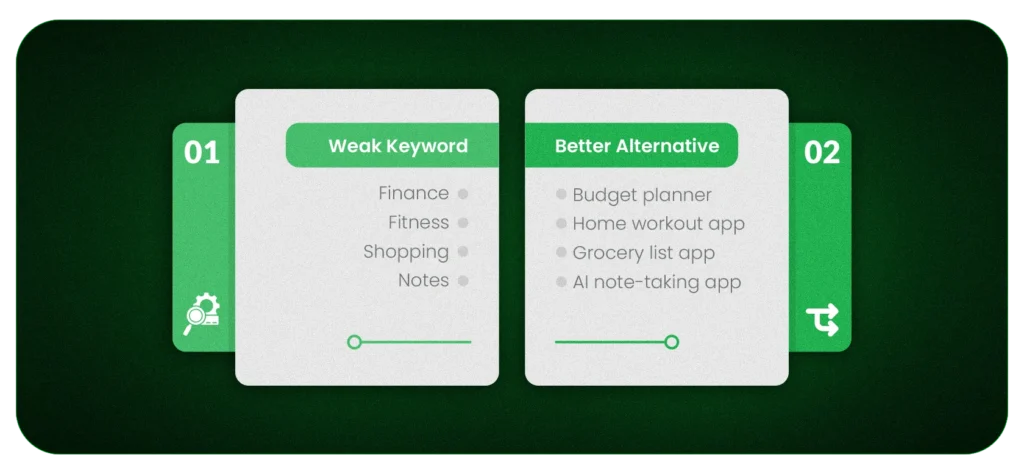
Finding the right keywords is only half the battle. You also need to place them strategically across your app’s metadata to turn search opportunities into visibility.
Mistake 3. Poorly Optimizing App Metadata (Title, Subtitle, Short Description)
Your app metadata helps the Apple App Store and Google Play Store understand what your app does and which searches it should appear for. It also influences whether users click on your app after discovering it.
Teams often prioritize branding over discoverability. And that is what makes valuable keyword opportunities in the process unused.
Why It Hurts App Visibility
Metadata remains one of the strongest relevance signals for app store ranking. If it lacks relevant keywords or fails to communicate value, your app becomes harder to discover.
Common issues include:
- Missing primary keywords in important metadata fields.
- Using vague or promotional copy instead of descriptive language.
- Ignoring platform-specific metadata opportunities.
- Repeating low-value wording instead of expanding keyword coverage.
For Example:
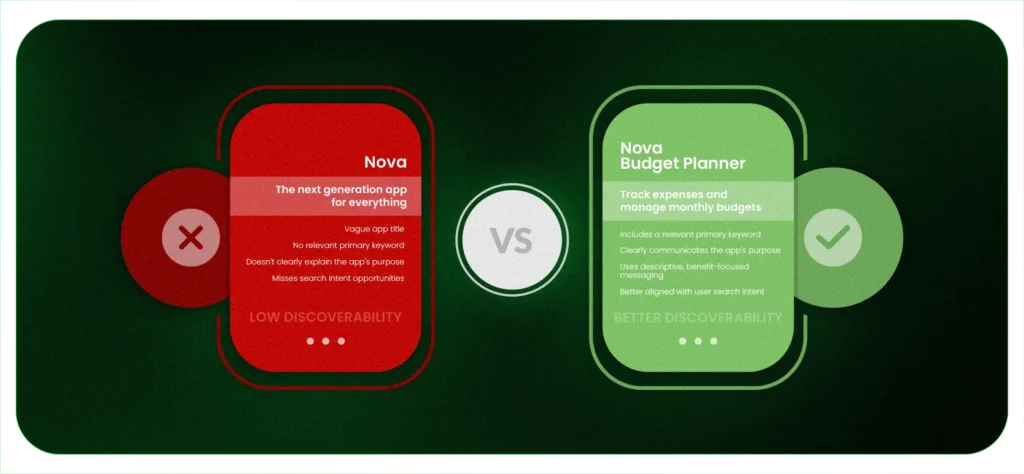
Understanding the Key Metadata Fields
Optimizing each field according to platform guidelines improves both discoverability and relevance.
| Metadata Field | Apple App Store | Google Play Store | Best Practice |
| App Title | Indexed | Indexed | Include your primary keyword naturally. |
| Subtitle | Indexed | Not available | Use it to reinforce your app’s main value proposition with supporting keywords. |
| Short Description | Not available | Indexed | Highlight the core benefit and include one primary keyword. |
| Long Description | Limited ranking influence | Indexed | Write naturally while covering relevant search terms. |
| Keyword Field (iOS) | Indexed | Not available | Use unique, relevant keywords without repeating terms already present in the title or subtitle. |
Before updating your metadata, review the latest platform recommendations.
The Apple App Store Connect documentation explains how indexed metadata fields work on iOS, while the Google Play Console Help documentation outlines best practices for optimizing your Google Play store listing.
How to Fix It
Remember that metadata serves two audiences at once. It helps the app stores understand your product. Second, it helps users decide whether it’s worth exploring.
So, treat metadata as a strategic asset instead of a branding exercise, just as you would during mobile app development.
Focus on:
- Lead with the keywords users actually search for.
- Keep descriptions concise, readable, and benefit-focused.
- Tailor metadata for each platform rather than using identical copy.
- Review keyword performance after major updates and refine metadata accordingly.
Mistake 4. Stuffing Keywords Instead of Writing Naturally
Using relevant keywords improves App Store Optimization, but repeating them excessively doesn’t. Keyword stuffing reduces readability and prevents you from targeting a wider range of search queries.
Good ASO balances relevance with clarity.
Why It Hurts App Visibility
Modern app store algorithms evaluate both keyword relevance and listing quality. If you repeat the same keyword, it doesn’t add any value; instead, it makes your metadata less useful for users.
For example:
Poor metadata
Budget Planner, Budget App, Budget Tracker, Budget Manager, Budget Tool
Better metadata
Track expenses, plan monthly budgets, and manage personal finances with easy-to-use budgeting tools.
The second example remains keyword-rich but reads like helpful product information rather than a list of search terms.
How to Fix It
Prioritize keyword variety instead of repetition.
- Place your primary keyword in high-impact fields, such as the title or subtitle.
- Use related keywords naturally throughout the metadata.
- Replace duplicate terms with relevant variations.
- Write for users first, then optimize for search.
Mistake 5. Using the Same ASO Strategy for iOS and Google Play
The Apple App Store and Google Play Store don’t evaluate App Store Optimization the same way. Applying the same metadata, keywords, and creative assets to both platforms overlooks those differences.
A strategy that performs well on one platform may limit your app visibility on the other.
Why It Hurts App Visibility
Each platform indexes different metadata fields and uses different ranking signals. Applying the same optimization strategy can lead to:
- Missed keyword opportunities.
- Underutilized metadata fields.
- Lower search relevance for platform-specific algorithms.
- Reduced app store ranking despite having a well-written listing.
Apple App Store vs. Google Play Store: How Each Platform Handles ASO
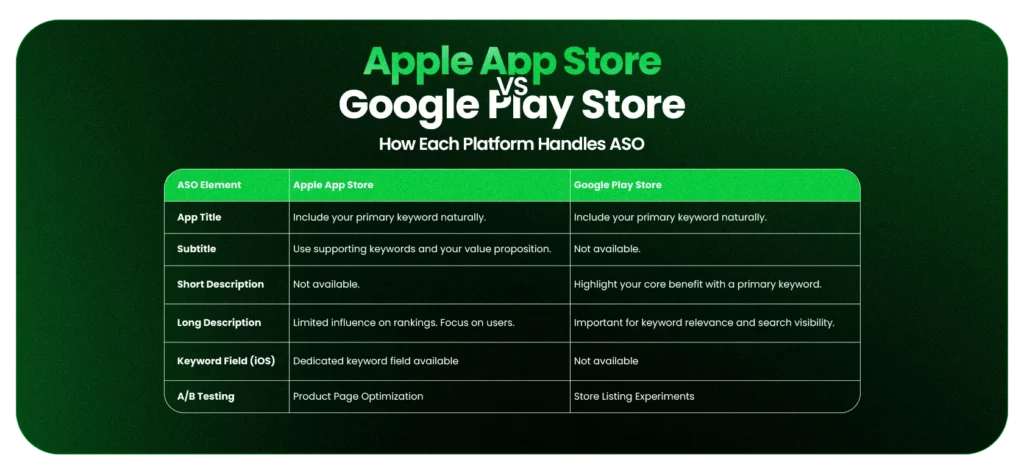
These differences explain why copying optimization strategies between platforms often reduces search performance instead of improving it.
How to Fix It
Build a platform-specific ASO strategy while keeping your brand messaging consistent.
For the Apple App Store:
- Optimize the app title and subtitle with your most valuable keywords.
- Make full use of the dedicated keyword field (iOS).
- Avoid repeating keywords already present in indexed fields.
- Track keyword performance through Apple’s App Store Connect.
For the Google Play Store:
- Optimize both the short and long descriptions naturally.
- Include relevant keywords where they improve readability.
- Monitor search performance using Google Play Console.
- Refresh metadata based on keyword trends and user behavior.
Practical Insight from Our ASO Project
Treat Apple App Store and Google Play as two different search engines, not one listing copied twice. When we optimized DPS Airem, each store was treated as its own indexing environment, which is what the differences in the table above actually look like in practice.
Mistake 6. Ignoring App Store Visual Assets (Screenshots, Icons, and Preview Videos)
Keywords help users discover your app. Visual assets convince them to install it.
Your app icon, screenshots, feature graphics, and preview videos create the first impression on users and encourage them to install it.
Why It Hurts Conversion
Users make installation decisions within seconds. And weak visuals make it harder for users to understand your app’s value.
Common issues include:
- Failing to communicate the app’s core value quickly.
- Looking outdated compared to competing apps.
- Highlighting features instead of user benefits.
- Creating inconsistent branding across the listing.
For example, a screenshot that says “Track Every Expense in Seconds” communicates value much faster than one showing only the app interface.
Key Visual Assets
How to Fix It
Create visuals that explain your app before users read the description.
- Lead with your strongest benefits in the first screenshots.
- Keep text concise and easy to scan.
- Update visuals after major product changes.
- Validate creative decisions with A/B testing.
Expert Tip: If users can’t understand what your app does within five seconds of viewing the screenshots, your visuals need improvement.
Mistake 7. Neglecting Ratings, Reviews, and User Feedback
Downloads bring users to your app, but ratings and reviews influence what happens next. It is a key factor that builds trust with both users and app stores, helping improve long-term app visibility.
That means ignoring user feedback allows small issues to grow into lower ratings and fewer organic installs.
Why It Hurts App Visibility
Users naturally compare ratings before downloading an app. A lower rating or unresolved reviews can reduce trust, even if your app ranks well.
Common impacts include:
- Lower conversion rates.
- Reduced user trust.
- Missed product improvement opportunities.
- Declining organic installs.
For example, two budgeting apps may rank for the same keyword, but most users will choose the one with a 4.8-star rating over one rated 3.6 stars with unresolved complaints.
How to Fix It
Think of reviews as an ongoing source of product feedback.
- Ask for ratings after positive user actions.
- Respond to both positive and negative reviews.
- Address recurring issues in future releases.
- Monitor review trends through App Store Connect and Google Play Console.
Mistake 8. Not Localizing Your App Store Listing
Users search in different languages and use different terminology across markets. A single English listing limits your ability to reach international audiences, even when your app is available globally.
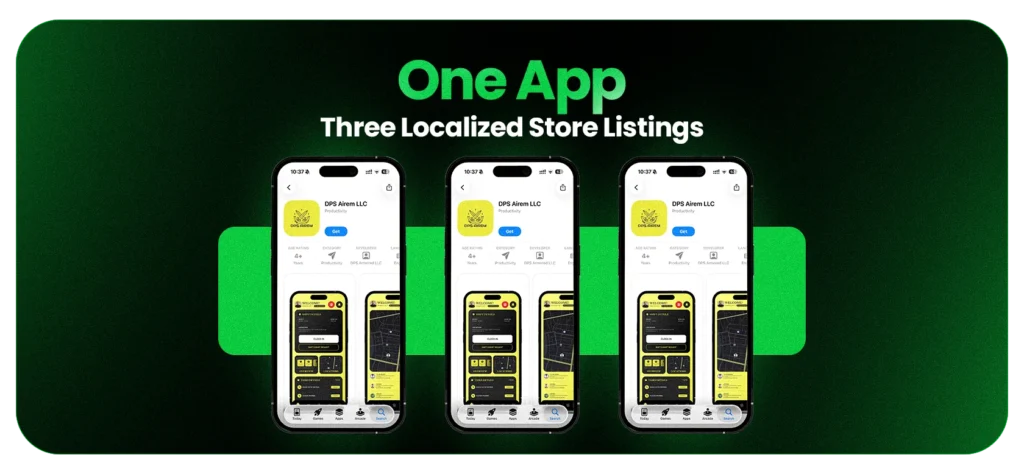
Localization improves both search discoverability and conversion by making your app more relevant to local users.
Why It Hurts App Visibility
Search habits vary significantly across countries and languages. Simply translating keywords word for word doesn’t guarantee better rankings because users often describe the same functionality differently.
Without localization, you may lead to:
- Miss international search traffic.
- Target ineffective keywords.
- Reduce conversions with generic messaging.
- Lose visibility to localized competitors.
Localize More Than Keywords
Effective localization should include:
| Element | Why It Matters |
| Keywords | Match regional search behavior. |
| App description | Improve clarity and trust. |
| Screenshots | Increase relevance and conversion. |
| Preview videos | Create a more localized experience. |
How to Fix It
Approach localization as part of your ASO strategy, not just translation.
Start by:
- Research keywords for each target market.
- Adapt metadata to local search intent.
- Localize screenshots and promotional copy.
- Monitor regional rankings and organic installs.
Mistake 9. Not Performing A/B Tests on Your Store Listing
No matter how experienced your team is, you cannot reliably predict which app icon, screenshot sequence, or description will drive the most installs. A/B testing removes the guesswork.
It helps you understand which variations improve your conversion rate and which changes fail to make an impact.
Without A/B testing, updates rely on assumptions instead of user behavior.
Why It Hurts App Visibility
A/B testing doesn’t directly improve rankings, but it can increase the number of users who install your app after discovering it.
Without testing, you may:
- Choose screenshots based on internal preferences instead of user behavior.
- Replace icons without measuring their impact.
- Rewrite descriptions without validating whether users respond better.
- Miss opportunities to improve install rates through incremental changes.
What Should You Test?
Not every element deserves equal attention. Start with the assets users notice first.
| Store Listing Element | Why Test It? |
| App Icon | Influences click-through from search results. |
| Screenshot Order | Highlights the most important benefits first. |
| Screenshot Copy | Tests different value propositions. |
| Preview Video | Evaluates engagement and product understanding. |
| App Description | Refine messaging and user expectations. |
How to Fix It
Make experimentation part of your ASO process.
A practical workflow looks like this:
- Test one element at a time.
- Run experiments until results are statistically meaningful.
- Apply the winning variation before testing something new.
- Use Product Page Optimization for the Apple App Store and Store Listing Experiments in Google Play Console.
Mistake 10: Failing to Monitor and Continuously Optimize ASO
ASO isn’t something you complete once. Search behavior changes, competitors update their listings, and app store algorithms continue to evolve.
Without regular optimization, app visibility can decline over time.
Why It Hurts App Visibility
If you stop monitoring ASO performance after reaching a satisfactory ranking, small issues can go unnoticed and become larger visibility problems.
And that’s what results in:
- Declining keyword rankings.
- Falling conversion rates after a product update.
- Competitors outranking your app for important search terms.
- Changes in user search behavior.
- New opportunities to improve metadata or creative assets.
Monitor the Metrics That Matter
Track these metrics regularly:
| Metric | Why It Matters |
| Keyword Rankings | Shows how visible your app is for target searches. |
| Search Impressions | Indicates how often users discover your app. |
| Conversion Rate | Measures how effectively your listing turns visitors into installs. |
| Organic Installs | Reflects long-term ASO performance. |
| Ratings and Reviews | Highlights user satisfaction and trust. |
| Competitor Rankings | Identifies emerging competitive threats and opportunities. |
How to Fix It
Build a periodic ASO review into your product operations.
A monthly review should include:
- Tracking keyword performance.
- Reviewing competitor listings.
- Analyzing changes in conversion rate.
- Evaluating new user reviews.
- Refreshing metadata after significant product updates.
- Planning future A/B testing opportunities.
Which ASO Mistakes Should You Fix First?
Not all ten mistakes carry equal weight. Fixing the wrong one first wastes effort, so sequencing them correctly turns this list into a roadmap instead of just a checklist.
This section helps you to prioritize the changes that have the greatest impact on app visibility and organic installs.
High-Priority Issues
- No keyword research
- Weak metadata
- Missing keywords in title
- Poor screenshots
These four sit at the top because they gate everything else. A well-designed icon or a five-star rating can’t compensate for an app that never surfaces in search to begin with.
Medium-Priority Issues
- Localization
- Ratings management
- Platform-specific optimization
Fix these once the fundamentals are solid. They expand reach and lift conversion, but they won’t rescue a listing that’s still invisible in search.
Long-Term Optimization
- Continuous testing
- Competitor monitoring
- Metadata refinement
ASO isn’t a one-time effort. Regular testing and optimization help maintain rankings, adapt to changing search behavior, and identify new opportunities for growth.
Work through the tiers in order. Start with discoverability, then improve conversion, and finally focus on continuous optimization. Following this order delivers more consistent results than trying to improve every part of your store listing at once.
Conduct a Quick ASO Audit Before Making Changes
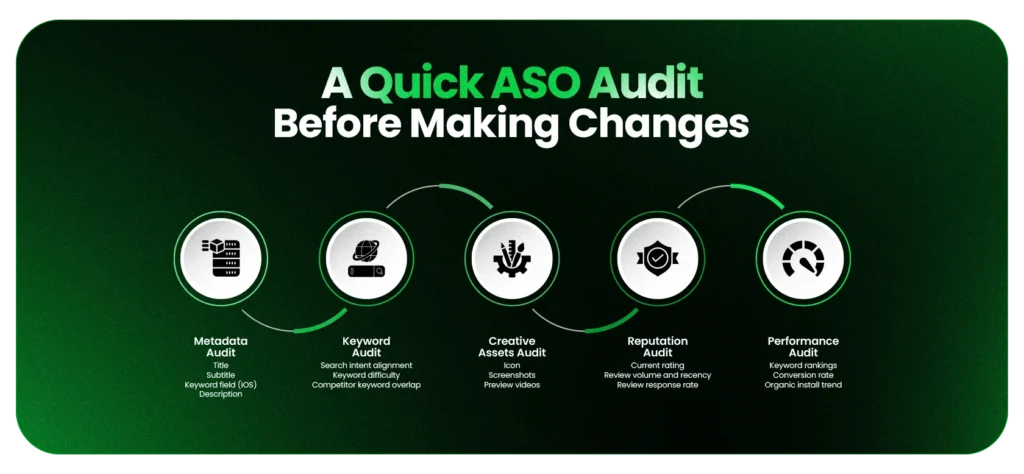
Before touching your app listing, confirm which of the issues above is actually broken for your app. An audit tells you where to start instead of guessing.
Metadata Audit
- Title
- Subtitle
- Keyword field (iOS)
- Description
Keyword Audit
- Search intent alignment
- Keyword difficulty
- Competitor keyword overlap
Creative Assets Audit
- Icon
- Screenshots
- Preview videos
Reputation Audit
- Current rating
- Review volume and recency
- Review response rate
Performance Audit
- Keyword rankings
- Conversion rate
- Organic install trend
Run through these five areas in order. The same structured approach drives successful mobile app development, where prioritizing the highest-impact issues leads to better outcomes.
Final Thoughts
None of these ten mistakes are exotic. Most apps make two or three of them at once, usually because ASO got treated as a launch checkbox instead of an ongoing discipline.
The fix isn’t a single overhaul. It’s picking the highest-priority issue from the audit above, fixing it, measuring what changed, and moving to the next one.
That cycle, repeated consistently, is what separates apps that stay buried on page eight from apps that compound their organic growth month over month.
Frequently Asked Questions
Skipping keyword research and leaving metadata unoptimized causes the most damage, since these fields determine which search queries the app can even appear for.
Google Play reindexes within hours; iOS takes longer due to app review. Most teams see measurable ranking movement within two to four weeks, depending on competition.
Yes. iOS has a hidden keyword field that Google Play doesn’t. Google Play indexes the title and both description fields directly for search. The two require separate keyword strategies, not one listing copied across both stores.
At least monthly, and immediately after major competitor or category shifts. A listing frozen between releases loses relevance as search trends and competitor metadata move.
Yes. Organic search already drives the majority of app store installs, so a well-optimized listing grows downloads without ad spend. Highly competitive categories still benefit from pairing ASO with paid acquisition to accelerate results.
Title, keywords, and metadata carry the most direct ranking weight, while localization and ratings act as secondary signals that influence how consistently rankings hold over time.
Product quality and store visibility are separate problems. A strong app with weak metadata, no keyword targeting, or a listing that hasn’t been updated since launch will stay buried regardless of how well it performs once installed.
ASO is about getting found in search and getting the searcher to install. App marketing includes paid acquisition, influencer campaigns, and channels outside the store. ASO is usually the highest-ROI starting point since it compounds without ongoing spend.
Screenshots influence conversion, not keyword rankings, since they aren’t indexed as searchable text. A stronger conversion rate can still support overall store performance indirectly, since both platforms factor engagement into their ranking signals.
Google Play reindexes metadata changes within hours, while iOS takes longer due to app review. Measurable ranking improvements typically appear within a few weeks, depending on indexing speed and category competition.
ASO tool pricing ranges from $19 to $39 a month for entry-level plans, roughly $99 a month for mid-tier platforms like AppTweak, and several hundred to a few thousand monthly for enterprise-grade tools.
SIDEBAR LIST START
- Top 10 ASO Mistakes That Kill App Visibility and How to Fix
- Which ASO Mistakes Should You Fix First?
- Conduct a Quick ASO Audit Before Making Changes
- Final Thoughts
- Frequently Asked Questions
SIDEBAR LIST END